
Subscriptions Shipping Overview
Subscriptions for Shopify Checkout integrates with the Shopify checkout, which means your Shopify shipping rates apply to all subscription orders.
For issues with your Shopify shipping rates, please refer to Shopify’s shipping guides or contact Shopify’s support directly.
To set up fixed shipping rates by country in Bold Subscriptions, please visit Fixed Shipping Rates in Subscriptions for Shopify Checkout.
This article explains how shipping works for both the initial and recurring subscription orders and how shipping information can be updated after a subscription is created.
Initial checkout
During their initial checkout, customers can choose their preferred delivery method (Ship or Pick up) and shipping method (Standard, Expedited, Local delivery, etc.) for their first shipment.
Recurring orders
If Pick up was selected in the initial checkout, then recurring orders will continue using that method.
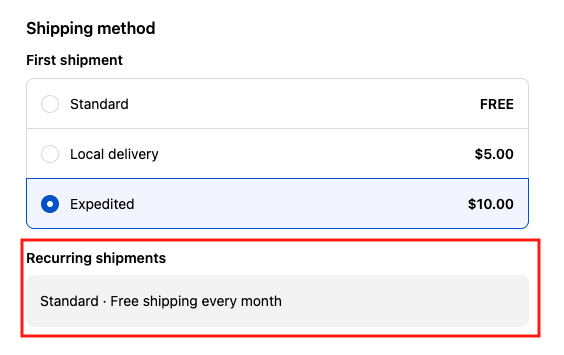
If Ship is selected, then Shopify applies the least expensive qualifying shipping method on recurring shipments regardless of the shipping method selected during the initial checkout.
Example
Exceptions
If fixed shipping rates by country are configured in Bold Subscriptions then those rates continue to apply on recurring orders as long as the customer's address qualifies.
If the customer's delivery or shipping method is manually changed after the initial checkout, then the selected rates continue to apply on recurring orders. Read more about this below.
Changing the delivery or shipping method after initial checkout
Bold Subscriptions allows both you and your customers to change the shipping or delivery method for existing subscriptions. When a customer's shipping method is changed, the new method will apply to all their future recurring orders, provided it's still valid for the customer's products and address.
If a subscription product or address change makes the previously selected shipping rate unavailable, then the cheapest available shipping method will apply.
For instructions on how to change the shipping method on an existing subscription, please visit the following articles:
Subscription shipping addresses
After a subscription is created, the shipping address stored on the subscription becomes independent from the customer’s Shopify address.
Updating the customer’s address in Shopify does not update the subscription shipping address.
Updating the subscription shipping address does not update the customer’s Shopify address.
Each subscription stores its own address.
Customers with multiple subscriptions can have different shipping addresses for each one.
This separation ensures consistent recurring order behavior and prevents address changes in Shopify from unintentionally affecting subscriptions.
Customers must update their subscription shipping address inside the subscription customer portal, not in their Shopify account settings. For step-by-step instructions, please visit Subscription Management: Customer Perspective.
Merchants can update subscribers' shipping addresses in the Subscription admin. For step-by-step instructions, please visit Subscription Management: Merchant Perspective.
FAQs
Is it possible to offer free shipping on all Subscription orders?
Yes. You can create and offer a discount code for free shipping on subscriptions from within Shopify. For more information about creating discount codes within Shopify, please visit Shopify's support article.
Bold Subscriptions also allows you to define fixed shipping rates by country. For more information about this feature, please visit Fixed Shipping Rates in Subscriptions for Shopify Checkout.
Can I change the delivery / shipping method for an existing subscriber?
Yes, both you and your customer are able to change the shipping or delivery method on existing subscriptions from within the customer portal. For detailed instructions, please visit the following articles:
You can also update your existing subscribers shipping rates using the Fixed Shipping Rate tool in Bold Subscriptions. For more information, please visit Fixed Shipping Rates in Subscriptions for Shopify Checkout.
If I update the price of my existing Shopify shipping rates, will the new amount automatically apply to my customer's existing orders?
Updated Shopify shipping rate prices are not automatically applied to existing subscriptions. The subscription would need to be cancelled and then re-purchased by your customer in order for the new rates to apply.
As a workaround, you can make a slight change in your customer's account which will cause Bold Subscriptions to look for a new shipping rate. For example, you could update the quantity of the product, delivery method, or address, and then revert this change so the correct information is properly stored along with the updated shipping rate.
Note: If you would like to create fixed shipping rates in Bold Subscriptions, you can update your existing subscribers shipping rates at the same time. For more information, please visit Fixed Shipping Rates in Subscriptions for Shopify Checkout.
When a customer chooses pickup or local delivery for their subscription, what email notification is sent?
Customers receive the respective email based on the shipping option that is selected in the Shopify checkout when a subscription is purchased.