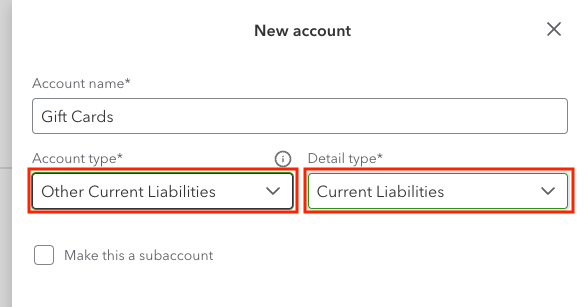
Missing Gift Card Liability Account
QuickBooks Sync can only connect to liability accounts configured as Account Type: Other Current Liabilities with Detail Type: Current Liabilities in QuickBooks Online. If you are seeing the error: You do not have any liability accounts. Please create one first, you must create a new liability account matching this criteria.
Example
Error example:
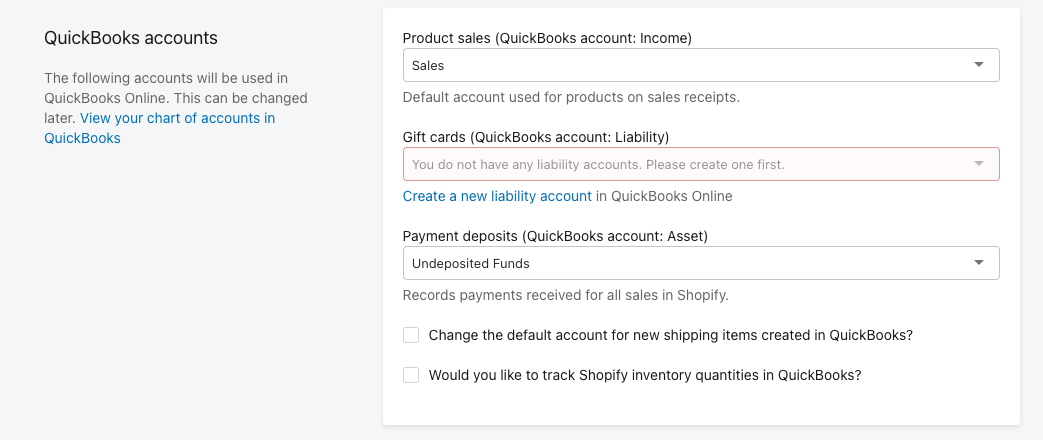
To create and connect the new liability account, please follow the steps below.
Note: You can also edit an existing liability account if you prefer.
In QuickBooks Online, navigate to Transactions > Chart of accounts.
Click New.
Configure your new liability account, and set the Account Type to Other Current liabilities and the Detail Type to Current liabilities.
Click Save.
Navigate to your Shopify admin, and open QuickBooks Sync.
Navigate to Settings.
Click Refresh settings.
Expand the dropdown menu under Gift cards (QuickBooks account: Liability), and select your new liability account.
Click Save.