
Unable to log into or access Bold Discounts
If are having trouble opening Bold Discounts or accessing the app admin, there are a few things you can try. This article helps you troubleshoot some issues that may be blocking you from accessing the app admin.
Account permissions
If you are unable to access your platform's Apps section, or are getting an error similar to Account doesn't have proper permissions, check to make sure you are logged into the correct account.
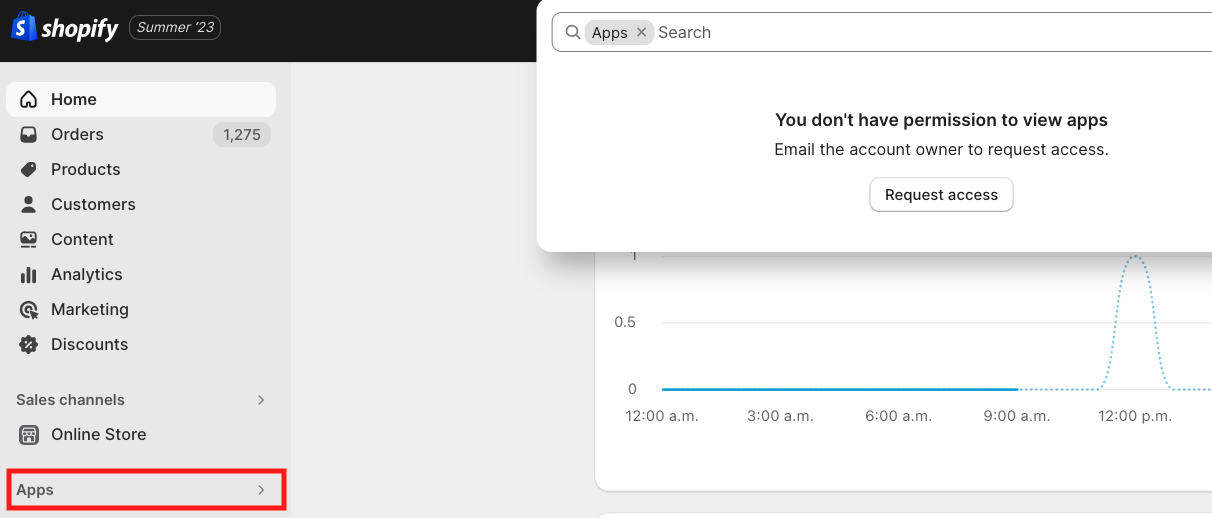
The above image indicates that this staff account does not have access to the Apps section. You would need to request additional permissions from the store owner to gain access to this portion of the admin.
Clear cache & enable third-party cookies
In order for Bold Discounts to function correctly in your browser, you must have third-party cookies enabled. Discounts stores information in your browser cookies that allow you to gain access and perform certain actions.
If your browser settings currently disallow the use of third-party cookies, you will not be able to access Discounts. The app will attempt to load for several seconds while showing a blank screen. Eventually, it may display an error message or icon.
To enable third party cookies, please select one of the following links that relate to your browser:
Once third-party cookies are allowed in your browser settings, please follow the steps below.
Log out of Shopify.
Clear your browser cache.
Ensure third-party cookies are enabled in your browser.
Log back into Shopify.
Open Bold Discounts.
If you still do not have access after following these steps, please ensure your browser allows cross-website tracking. For more information, please see the section below.
Allow cross-website tracking
In some versions of Chrome and Safari, you may have trouble accessing our app when using your mobile browser or other devices due to a cross-website tracking setting. This permission must be enabled in your browser settings.
In Chrome, enable the setting to Allow Cross-Website Tracking.
In Safari, disable the setting Prevent cross-site tracking.