Custom Upsell Template Styles
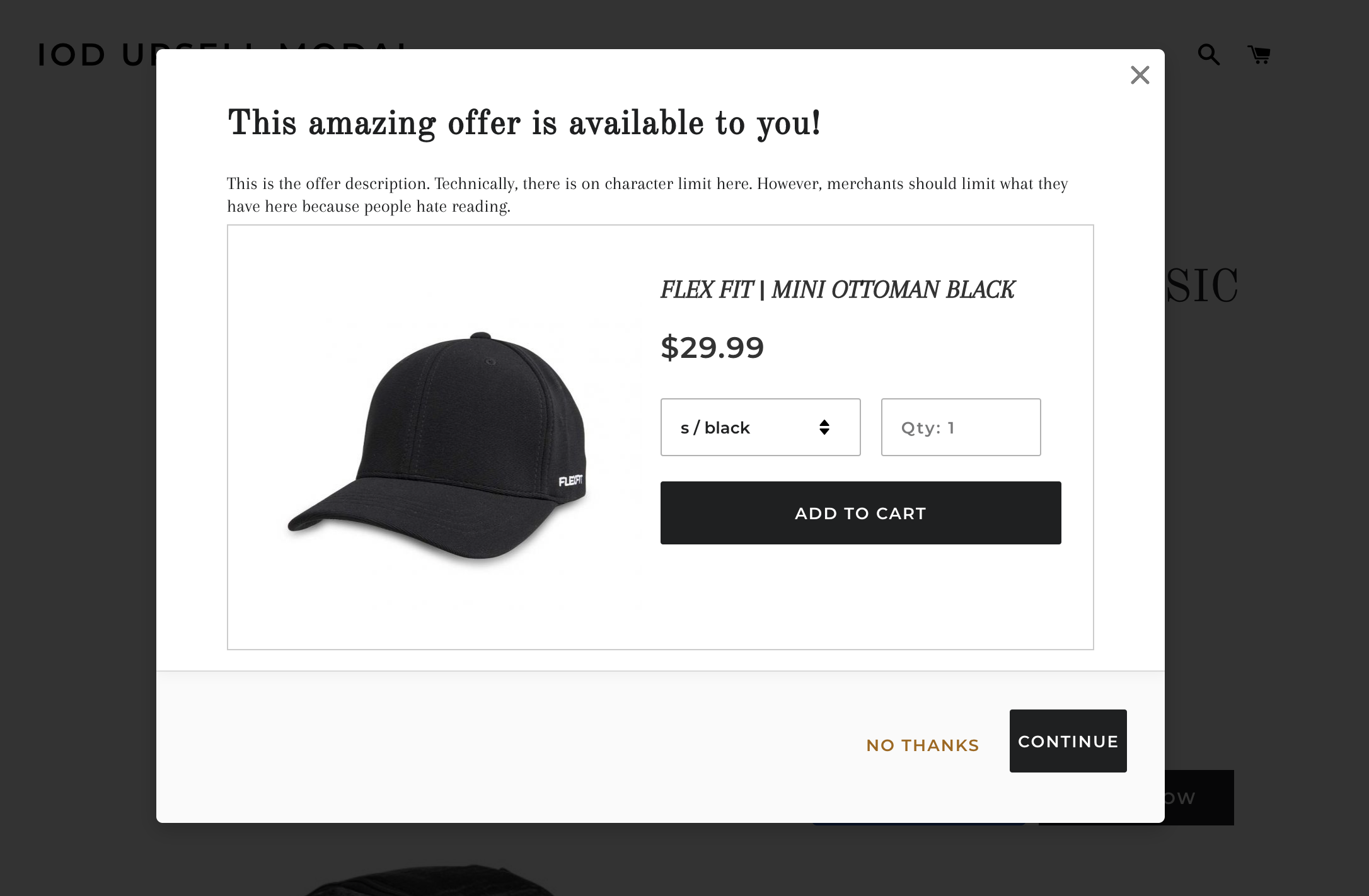
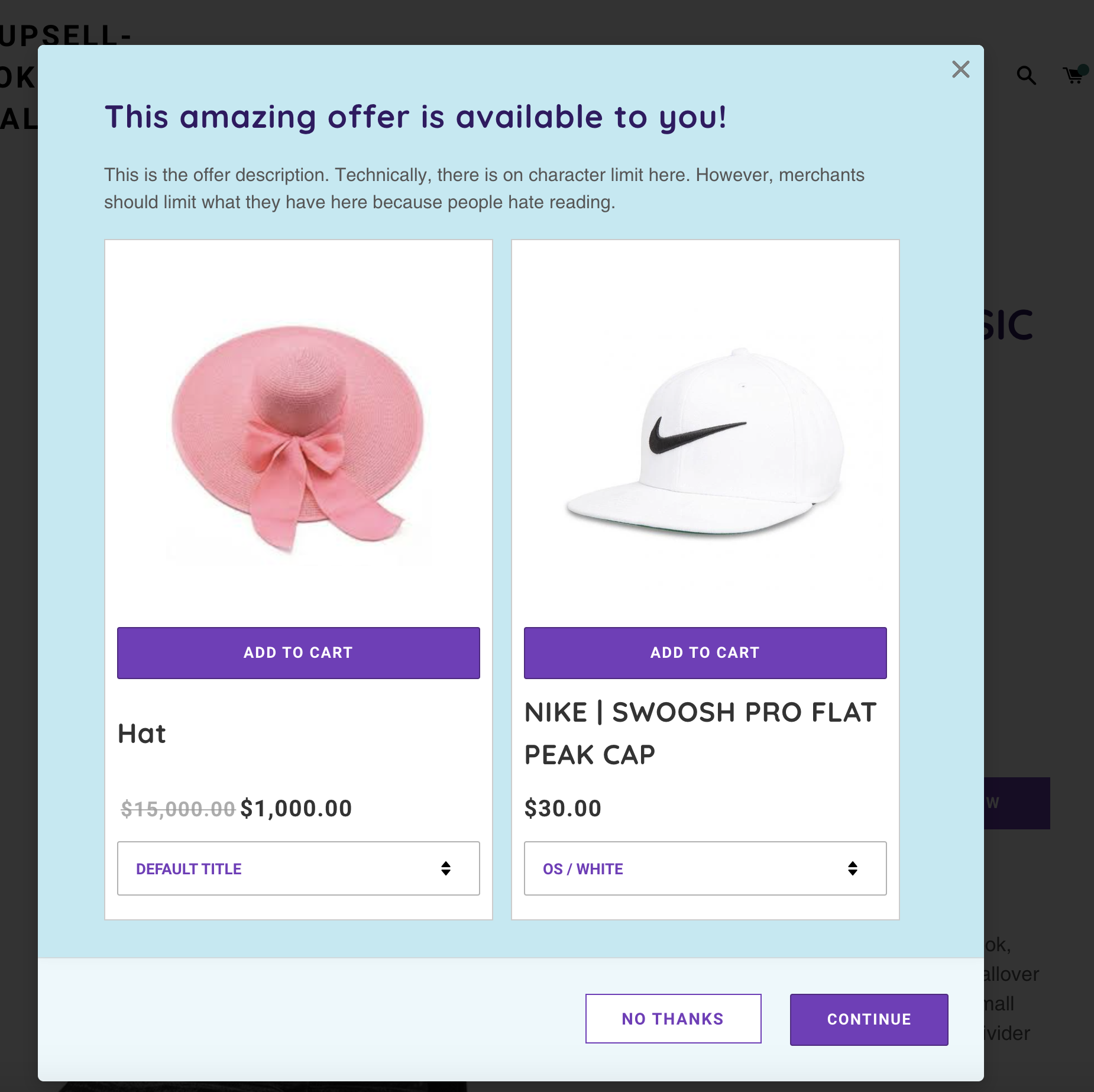
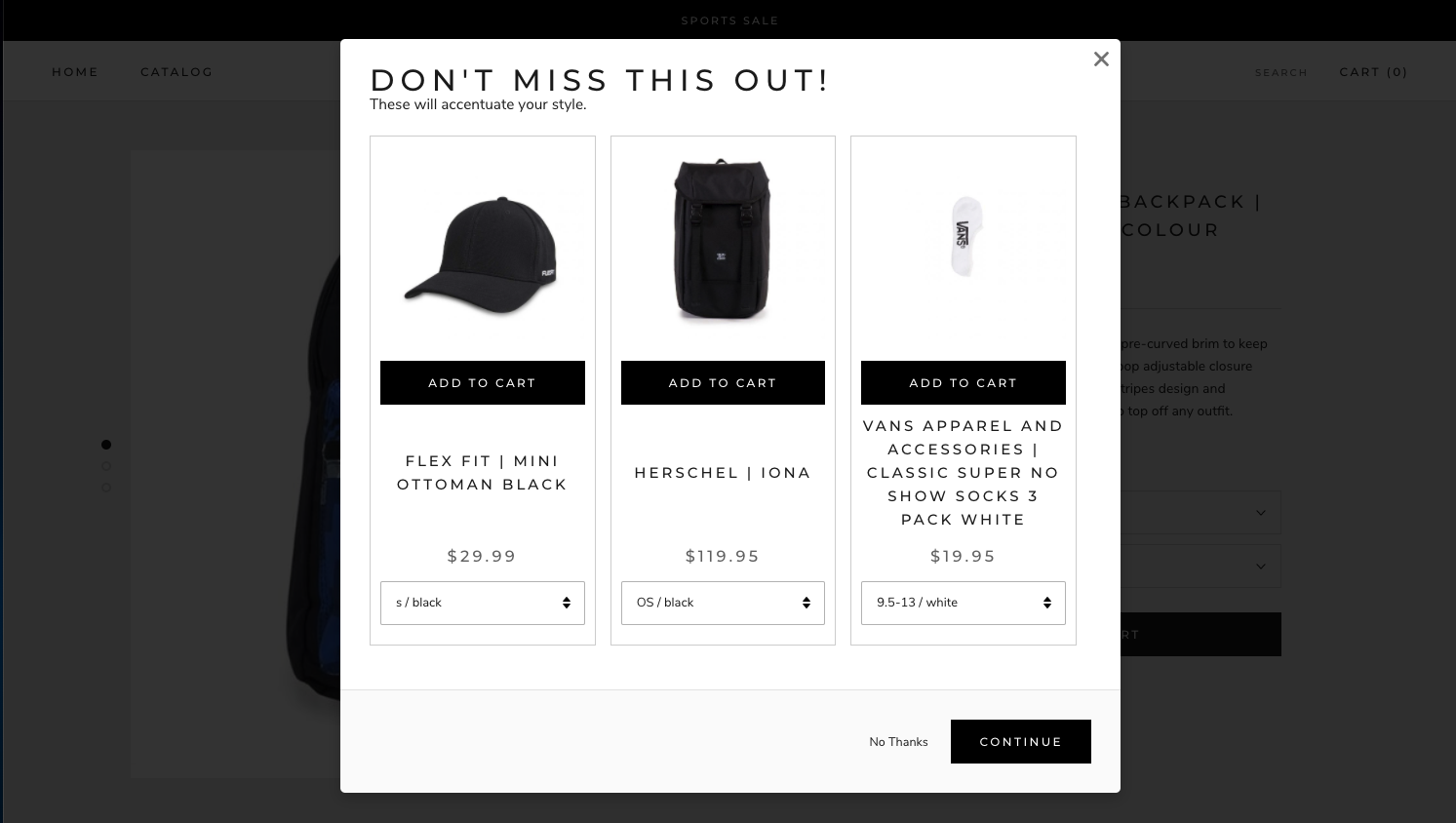
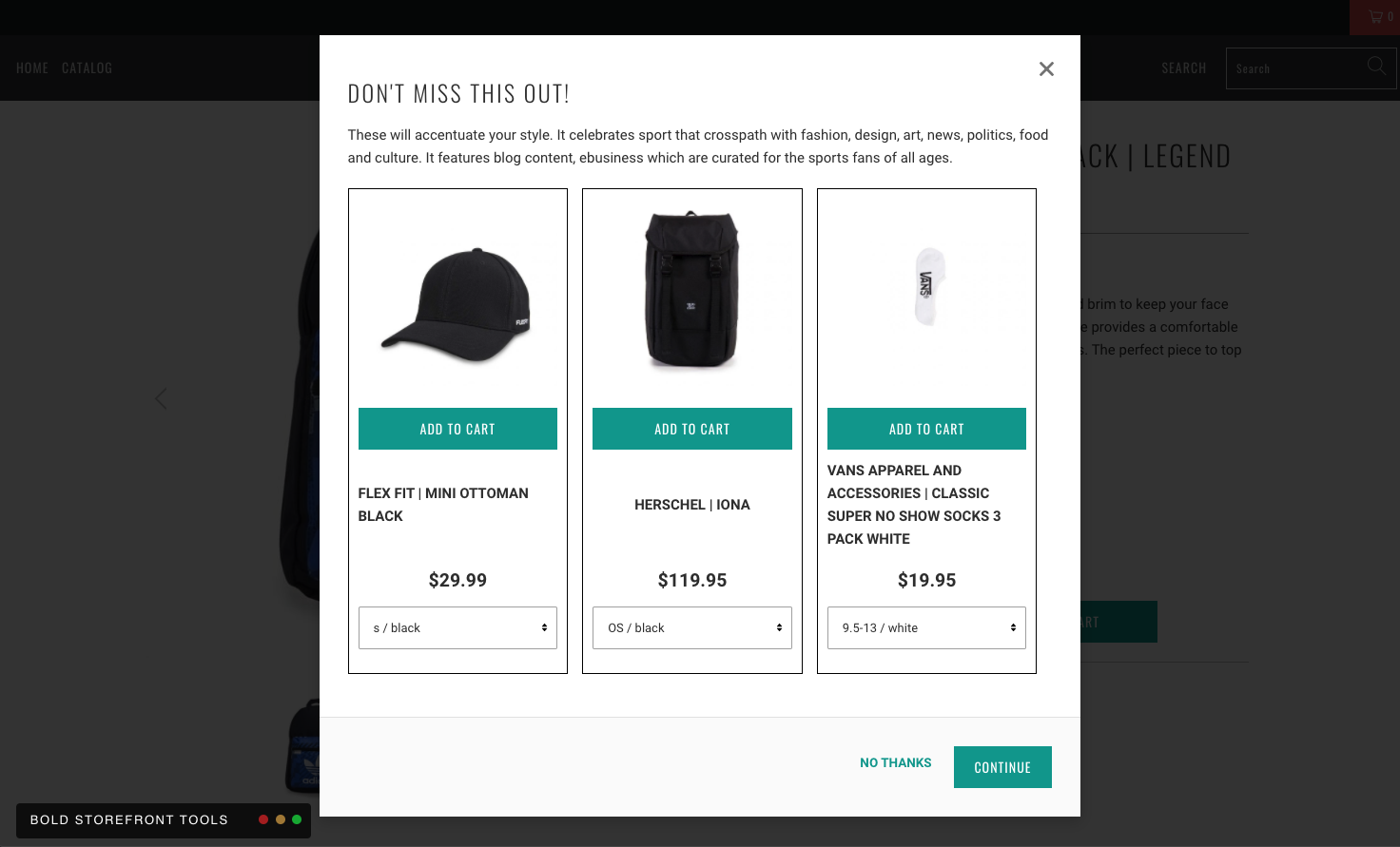
This guide provides a few custom Upsell templates to help you quickly style the the Product Page Pop-up and Cart Page Pop-up offers. These templates are sorted by theme and allow you to simply copy and paste the CSS code into your theme files for a new look.
Alert: Making adjustments to Bold Upsell requires knowledge of CSS. If you are not comfortable with adding CSS code, one of our partners could complete one of these customizations or a similar customization as a paid customization on your store. Please visit Storetasker.
CSS by Theme
Brooklyn Classic
Setup
To apply this template on your store, please follow these steps:
From Shopify's admin, select Online Store.
Click the three dots (...) next to your theme, and select Edit code.
Expand the Assets folder.
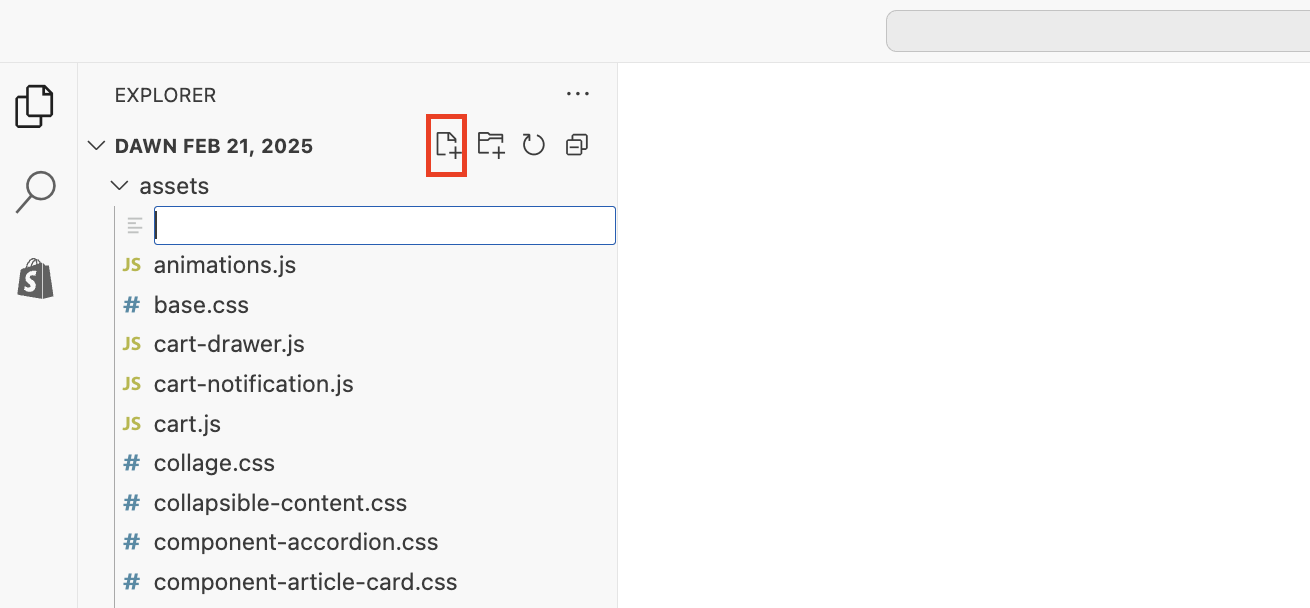
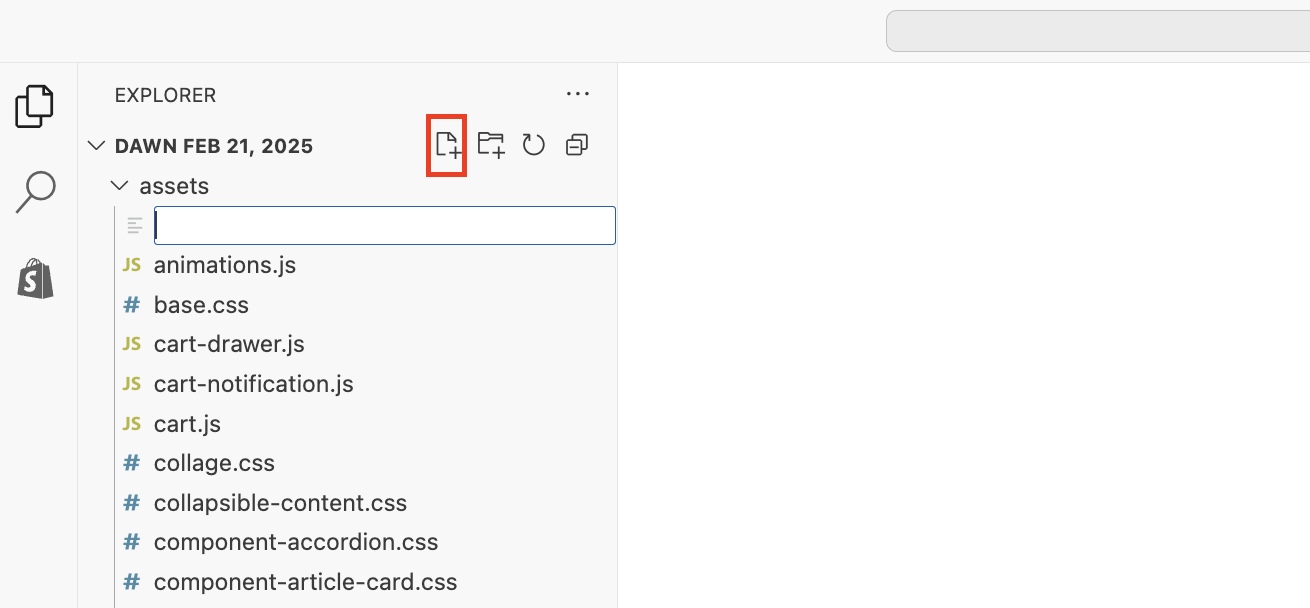
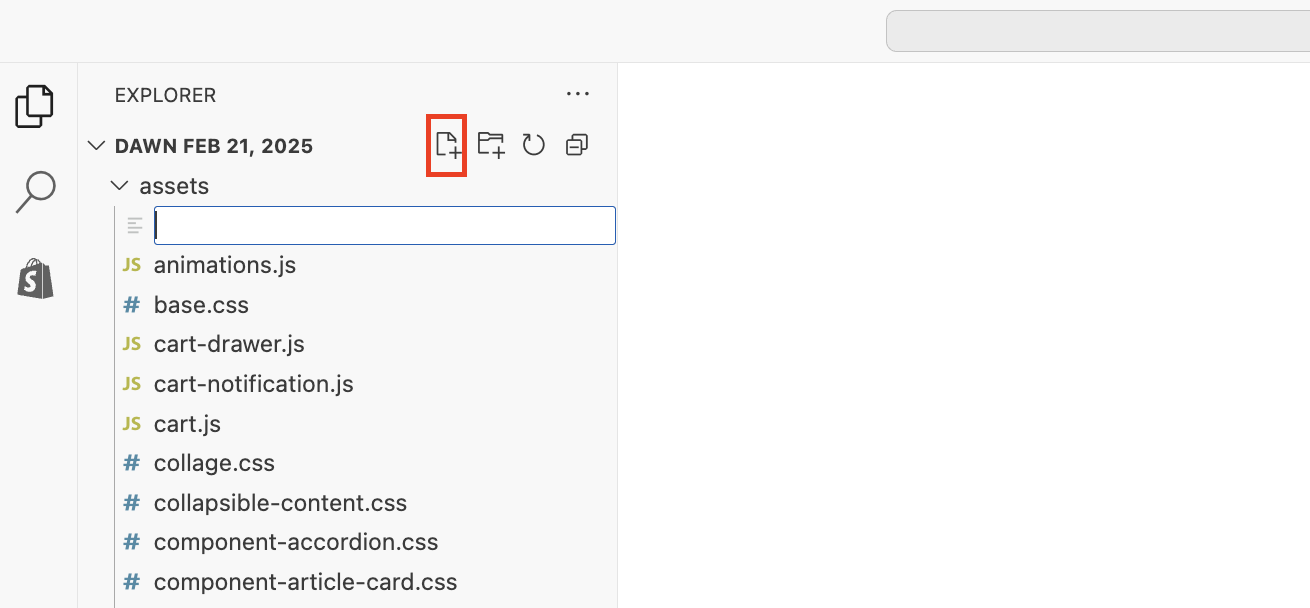
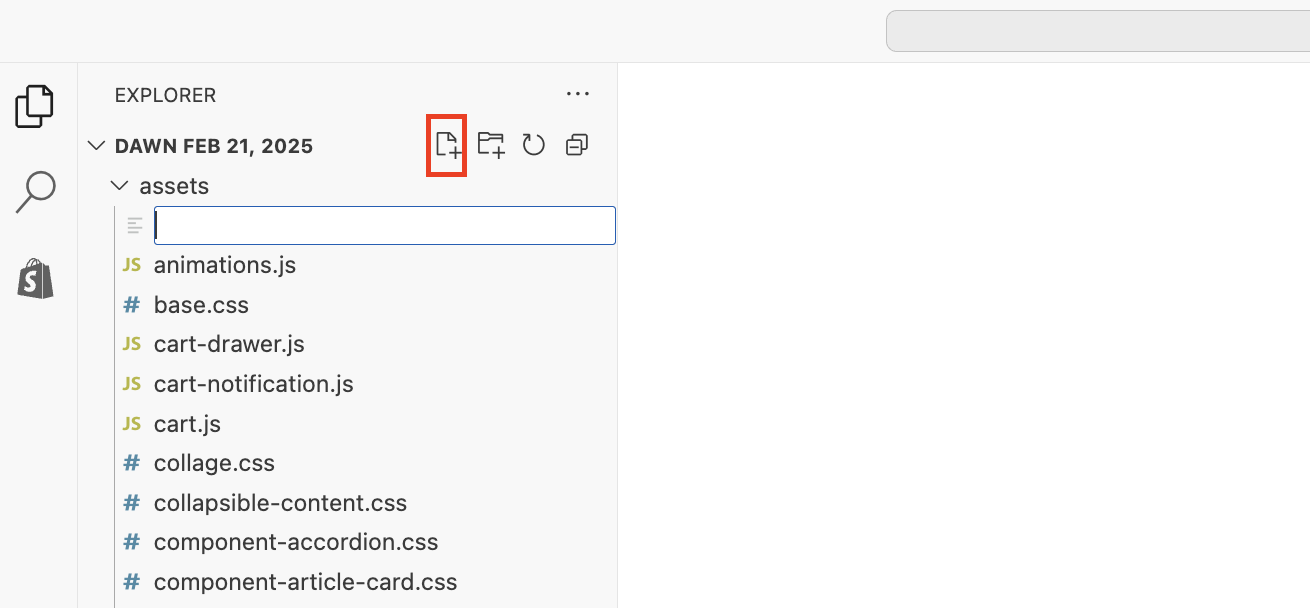
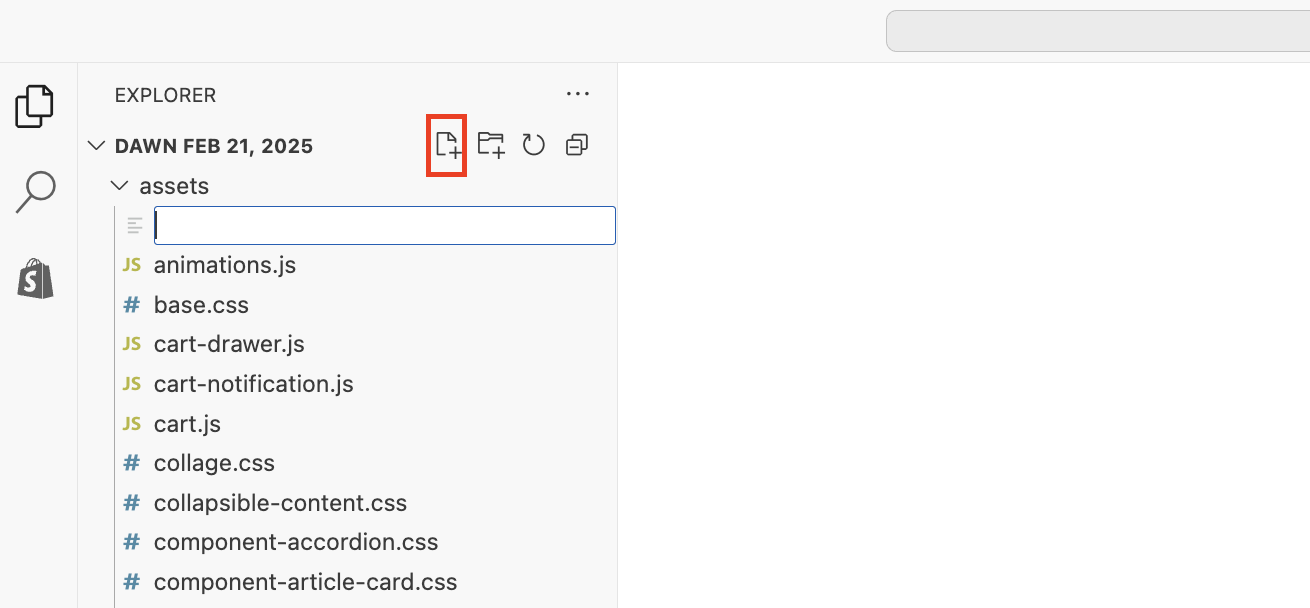
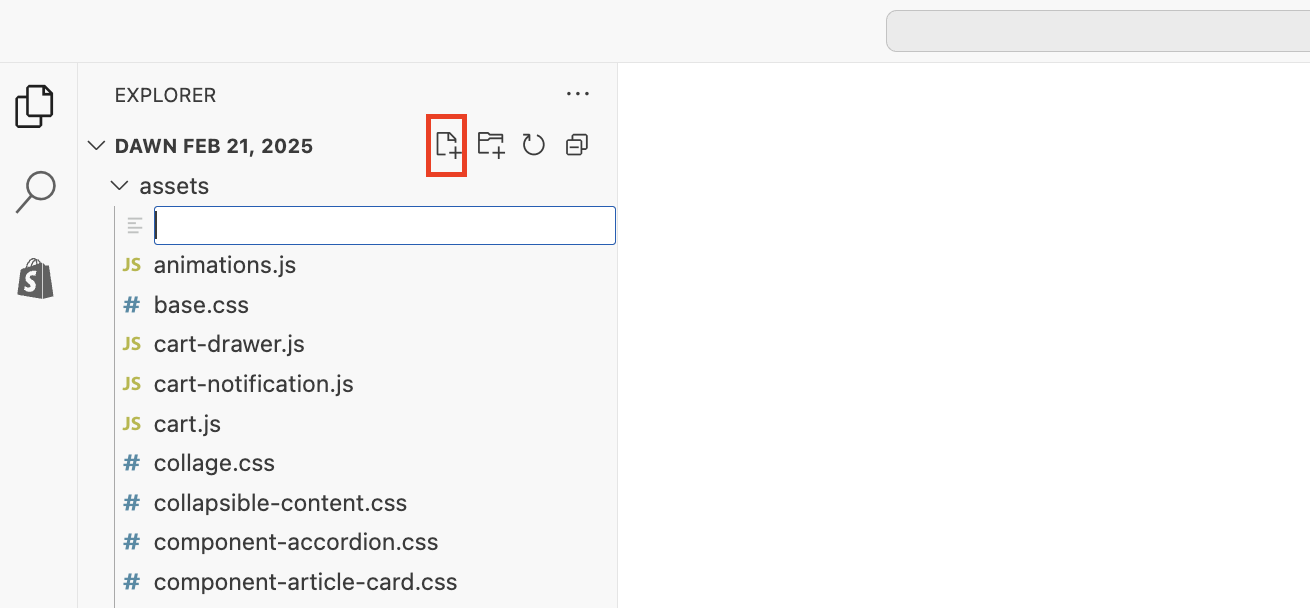
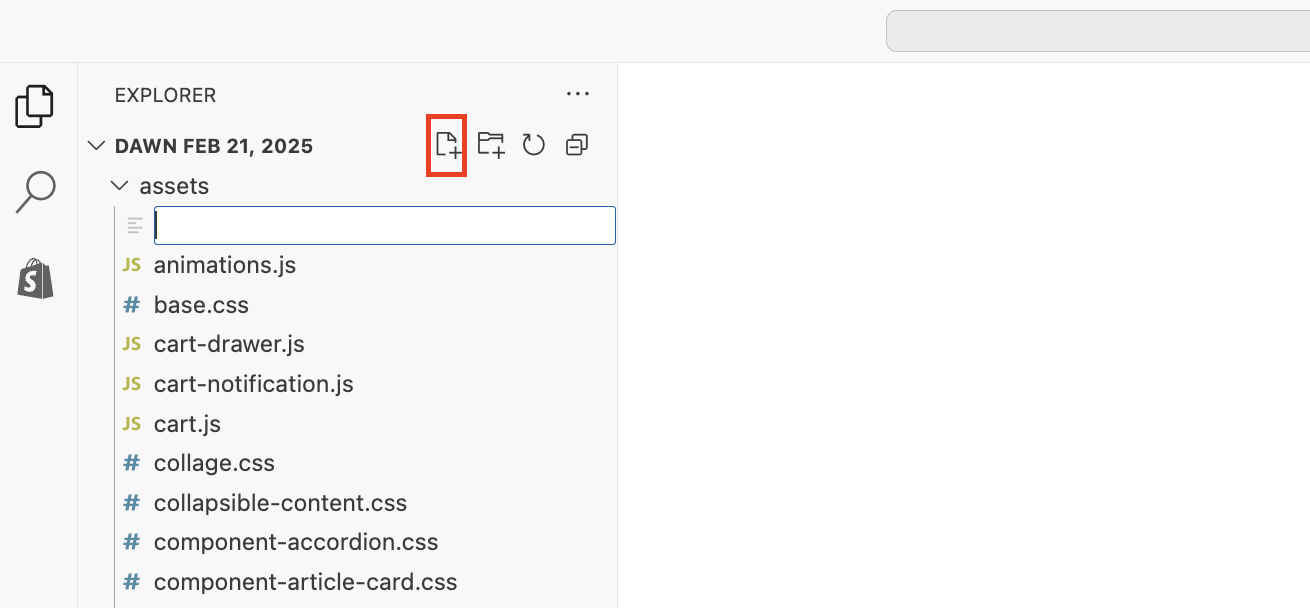
Click on the New File icon.
Name the file bold-custom.css.
.bold-modal__content {
    box-shadow: 1px 1px 10px 2px rgba(235, 235, 235, 0.5);
    padding: 2.5rem 3.5rem 1rem;
}
.bold-upsell__intro-heading {
    text-transform: none;
    letter-spacing: 0.05rem;
    margin: 0 0 17.5px;
    font-family:"Old Standard TT",serif;
    font-weight: 700;
    font-style: normal;
    line-height: 1.5;
    word-wrap: break-word;
    font-family: Old Standard TT;
    font-size: 27px;
    letter-spacing: 0.03em;
    text-align: left;
    color: #3D3F41;
}
.bold-upsell__intro-content{
font-family: Arapey,serif;
font-size: 1.4em;
}
.bold-upsell__products-list {

}
.bold-product__button,
.bold-product__button:link,
.bold-product__button:visited,
.bold_product__button:hover,
.bold_product__button:active,
.bold_product__button:focus,
.bold-upsell__button--primary:link,
.bold-upsell__button--primary:visited,
.bold-upsell__button--primary:hover,
.bold-upsell__button--primary:active,
.bold-upsell__button--primary:focus {
    line-height: 1.4;
    padding-left: 5px;
    padding-right: 5px;
    white-space: normal;
    margin-top: 0;
    margin-bottom: 10px;
    min-height: 44px;
    user-select: none;
    appearance: none;
    text-decoration: none;
    text-align: center;
    vertical-align: middle;
    cursor: pointer;
    border: 1px solid #1f2021;
    background-color: #1f2021;
    color: #fff;
    font-family: Montserrat,sans-serif;;
    font-style: normal;
    font-weight: 600;
    text-transform: uppercase;
    letter-spacing: 0.08em;
    font-size: 0.8125rem;
}

.bold-upsell__button--secondary,
.bold-upsell__button--secondary:link,
.bold-upsell__button--secondary:visited,
.bold-upsell__button--secondary:hover,
.bold-upsell__button--secondary:active,
.bold-upsell__button--secondary:focus {
    color: #a56600;
    text-decoration: none;
    background: transparent;
    font-family: Montserrat,sans-serif;;
    font-style: normal;
    font-weight: 600;
    text-transform: uppercase;
    letter-spacing: 0.08em;
    font-size: 0.8125em;
}
    }
a.bold-upsell__button.bold-upsell__button--primary {
    width: fit-content;
    display: inline;
}
p {
  display: block;
  margin-block-start: 1em;
  margin-block-end: 1em;
  margin-inline-start: 0px;
  margin-inline-end: 0px;
  font-size: 1.2em;
  font-family: Arapey,serif;
  font-style: normal;
  font-weight: 400;
  color: #1f2021);
  line-height: 1.3;
}
.bold-product__variant-selector {
    -webkit-appearance: none;
    -moz-appearance: none;
    appearance: none;
    background-repeat: no-repeat;
    background-position: right 10px center;
    line-height: 1.8;
    padding-right: 28px;
    text-indent: 0.01px;
    cursor: pointer;
    padding-top: 11px;
    padding-left: 15px;
    padding-bottom: 10px;
    border: 1px solid rgba(0,0,0,0.3);
    background-color: transparent;
    max-width: 100%;
    border-radius: 2px;
    font-family: Montserrat,sans-serif;
    font-weight: 600;
    font-style: normal;
    font-size: 1em;
    width: 55%;
    display: inline;
    float: left;
    margin: 10px 0px;
}
.bold-product__pricing {
    justify-content: normal;
}
.bold-product__price, .bold-product__description, .bold-product-review{
    font-family: Montserrat,sans-serif;
    font-weight: 600;
    letter-spacing: 0.04em;
    color: rgba(0, 0, 0, 0.8);
    font-size: 180%;
}
.bold-product__title {
    font-family: Montserrat,sans-serif;
    font-style: italic;
    font-size: 1.6em;
    font-family: Arapey,serif;
    color: rgba(0, 0, 0, 0.8);
    justify-content: left;
}
.bold-control-group__item {
    display: inline-block;
    width: 40%;
}
#bold-modal-first__window .bold-product__quantity-field {
    margin: 10px 0px;
    text-transform: capitalize;
}
Click Save.
Expand the Layout folder, and open theme.liquid.
Copy and paste this code directly under the {{ content_for_header }}:
{{ 'bold-custom.css' | asset_url | stylesheet_tag }}Click Save.
Brooklyn Playful
Setup
To apply this template on your store, please follow these steps:
From Shopify's admin, select Online Store.
Click the three dots (...) next to your theme, and select Edit code.
Expand the Assets folder.
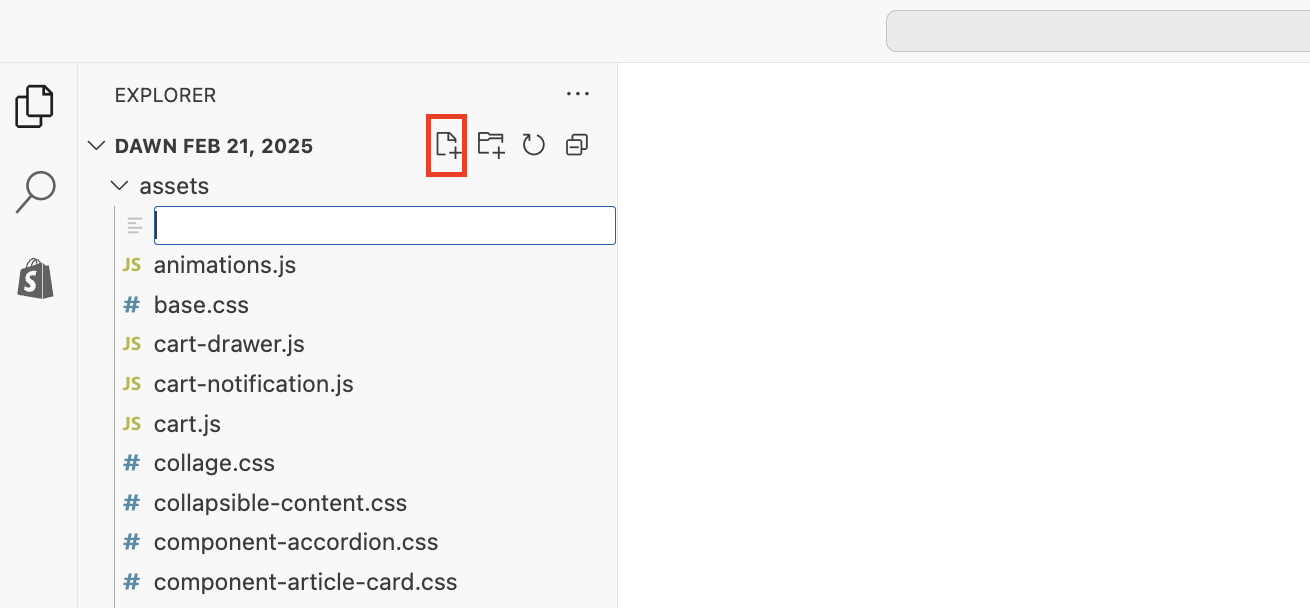
Click on the New File icon.
Name the file bold-custom.css.
.bold-modal__content {
    box-shadow: 1px 1px 10px 2px rgba(235, 235, 235, 0.5);
    padding: 2.5rem 3.5rem 1rem;
}
.bold-upsell {
    background: #BDE9F2;
}
.bold-modal__footer {
    border-top: 1px solid rgba(0,0,0,0.1);
    background-color: rgba(189,233,242, 0.3);
}
.bold-upsell__intro-heading {
    text-transform: none;
    letter-spacing: 0.05rem;
    margin: 0 0 17.5px;
    font-family: Quicksand,sans-serif;
    font-weight: bold;
    font-style: normal;
    line-height: 1.5;
    word-wrap: break-word;
    font-size: 27px;
    letter-spacing: 0.03em;
    text-align: left;
    color: #321863;
}
.bold-upsell__intro-content{
font-size: 1.3em;
}
.bold-upsell__products-list {

}
.bold-product__button,
.bold-product__button:link,
.bold-product__button:visited,
.bold_product__button:hover,
.bold_product__button:active,
.bold_product__button:focus,
.bold-upsell__button--primary:link,
.bold-upsell__button--primary:visited,
.bold-upsell__button--primary:hover,
.bold-upsell__button--primary:active,
.bold-upsell__button--primary:focus {
    line-height: 1.4;
    padding: 12px 30px;
    white-space: normal;
    margin-top: 0;
    min-height: 44px;
    user-select: none;
    appearance: none;
    text-decoration: none;
    text-align: center;
    vertical-align: middle;
    cursor: pointer;
    background-color: #7737bd;
    color: #fff;
    font-family: Roboto,sans-serif;
    font-style: normal;
    font-weight: 600;
    text-transform: uppercase;
    letter-spacing: 0.08em;
    font-size: 0.8125rem;
}

.bold-upsell__button--secondary,
.bold-upsell__button--secondary:link,
.bold-upsell__button--secondary:visited,
.bold-upsell__button--secondary:hover,
.bold-upsell__button--secondary:active,
.bold-upsell__button--secondary:focus {
    background-color: #fff;
    border: 1px solid #7737bd;
    color: #7737bd;
    padding: 12px 30px;
    text-decoration: none;
    font-family: Roboto,sans-serif;
    font-style: normal;
    font-weight: 600;
    text-transform: uppercase;
    letter-spacing: 0.08em;
    font-size: 0.8125em;
}
    }
a.bold-upsell__button.bold-upsell__button--primary {
    width: fit-content;
    display: inline;
}
p {
  display: block;
  margin-block-start: 1em;
  margin-block-end: 1em;
  margin-inline-start: 0px;
  margin-inline-end: 0px;
  font-size: 1.2em;
  font-size: calc(var(--font-size-base) * 1px);
  font-family: var(--font-stack-body);
  font-style: var(--font-style-body);
  font-weight: var(--font-weight-body);
  color: var(--color-text);
  line-height: 1.5;
}
.bold-product__variant-selector {
    -webkit-appearance: none;
    -moz-appearance: none;
    appearance: none;
    background-repeat: no-repeat;
    background-position: right 10px center;
    line-height: 1.8;
    padding-right: 28px;
    text-indent: 0.01px;
    cursor: pointer;
    padding-top: 11px;
    padding-left: 15px;
    padding-bottom: 10px;
    border: 1px solid rgba(0,0,0,0.3);
    background-color: transparent;
    max-width: 100%;
    border-radius: 2px;
    font-family: Roboto,sans-serif;
    font-weight: 600;
    font-style: normal;
    font-size: 1em;
    margin: 10px 0px;
    color: #7737bd;
    text-transform: uppercase;
}
.bold-product__pricing {
    justify-content: normal;
}
.bold-product__price, .bold-product__description, .bold-product-review{
    font-family: Roboto,sans-serif;
    font-weight: 600;
    letter-spacing: 0.04em;
    color: rgba(0, 0, 0, 0.8);
    font-size: 150%;
}
.bold-product__title {
    font-family: Quicksand,sans-serif;
    font-style: normal;
    font-weight: bold;
    font-size: 1.8em;
    color: rgba(0, 0, 0, 0.8);
    justify-content: left;
    letter-spacing: 0.02em;
    text-align: left;
}
.bold-product {
    background-color: rgba(255,255,255, 1);
}
Click Save.
Expand the Layout folder, and open theme.liquid.
Copy and paste this code directly under the {{ content_for_header }}:
{{ 'bold-custom.css' | asset_url | stylesheet_tag }}Click Save.
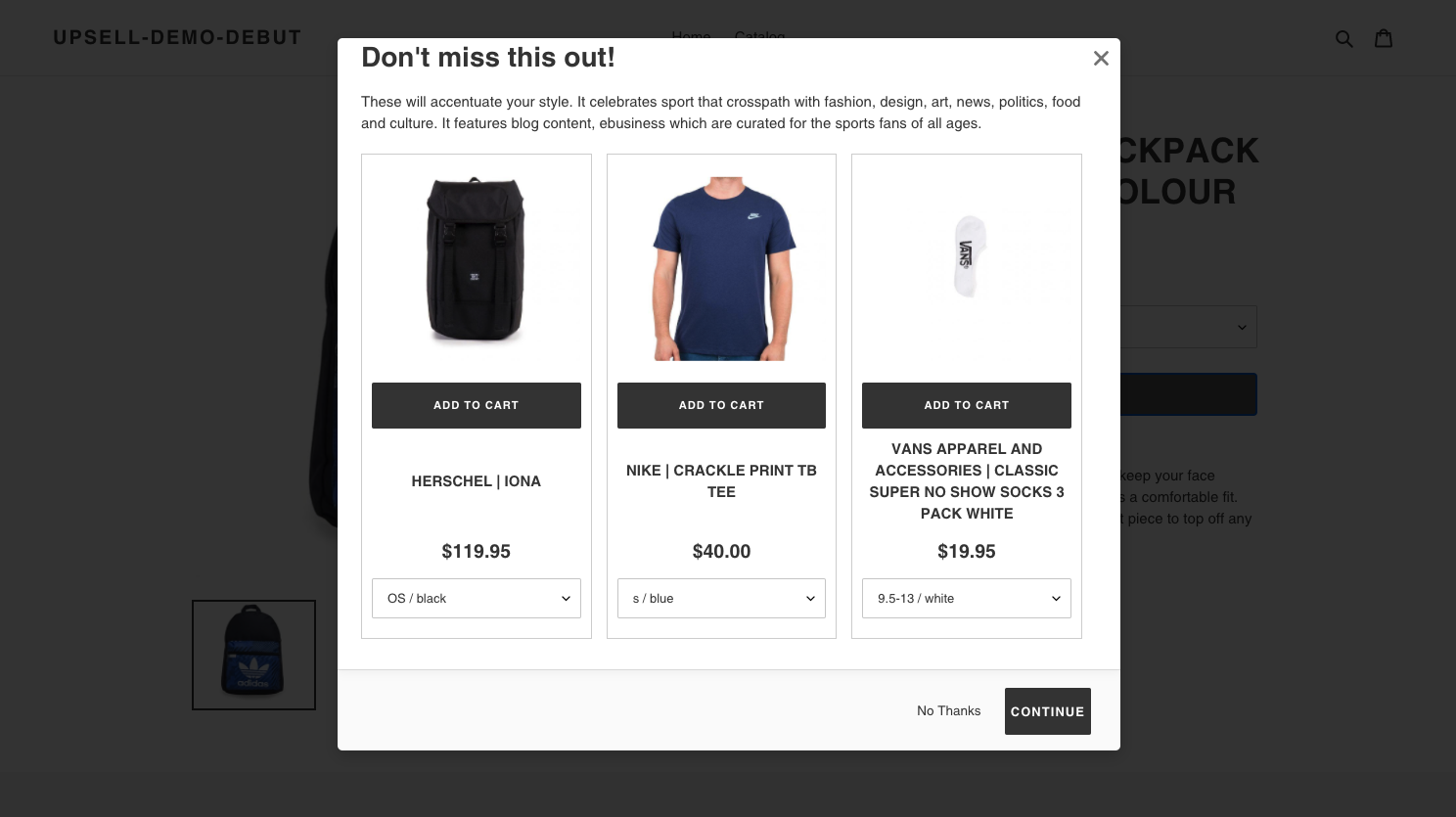
Debut
Setup
To apply this template on your store, please follow these steps:
From Shopify's admin, select Online Store.
Click the three dots (...) next to your theme, and select Edit code.
Expand the Assets folder.
Click on the New File icon.
Name the file bold-custom.css.
.bold-modal__content {
    box-shadow: 1px 1px 10px 2px rgba(235, 235, 235, 0.5);
    padding: 0.2rem 1.5rem 1rem;
}
.bold-upsell__intro-heading {
    font-size: calc(((var(--font-h1-desktop))/ (var(--font-size-base))) * 1em);
    text-transform: none;
    letter-spacing: 0;
    margin: 0 0 17.5px;
    font-family: var(--font-stack-header);
    font-style: var(--font-style-header);
    font-weight: var(--font-weight-header);
    line-height: 1.2;
    word-wrap: break-word;
}
.bold-product__button,
.bold-product__button:link,
.bold-product__button:visited,
.bold_product__button:hover,
.bold_product__button:active,
.bold_product__button:focus,
.bold-upsell__button--primary:link,
.bold-upsell__button--primary:visited,
.bold-upsell__button--primary:hover,
.bold-upsell__button--primary:active,
.bold-upsell__button--primary:focus {
    display: block;
    width: 100%;
    line-height: 1.4;
    padding-left: 5px;
    padding-right: 5px;
    white-space: normal;
    margin-top: 0;
    margin-bottom: 10px;
    min-height: 44px;
    user-select: none;
    appearance: none;
    text-decoration: none;
    text-align: center;
    vertical-align: middle;
    cursor: pointer;
    border: 1px solid transparent;
    border-radius: 2px;
    background-color: var(--color-btn-primary);
    color: var(--color-btn-primary-text);
    font-family: var(--font-stack-header);
    font-style: var(--font-style-header);
    font-weight: var(--font-weight-header);
    text-transform: uppercase;
    letter-spacing: 0.08em;
    font-size: calc(((var(--font-size-base) - 2) / (var(--font-size-base))) * 1em);
}
a.bold-upsell__button.bold-upsell__button--primary {
    width: fit-content;
    display: inline;
}
p {
  display: block;
  margin-block-start: 1em;
  margin-block-end: 1em;
  margin-inline-start: 0px;
  margin-inline-end: 0px;
  font-size: calc(var(--font-size-base) * 1px);
  font-family: var(--font-stack-body);
  font-style: var(--font-style-body);
  font-weight: var(--font-weight-body);
  color: var(--color-text);
  line-height: 1.5;
}
.bold-product__variant-selector {
    -webkit-appearance: none;
    -moz-appearance: none;
    appearance: none;
    background-image: var(--svg-select-icon);
    background-repeat: no-repeat;
    background-position: right 10px center;
    line-height: 1.8;
    padding-right: 28px;
    text-indent: 0.01px;
    cursor: pointer;
    padding-top: 8px;
    padding-left: 15px;
    padding-bottom: 8px;
    border: 1px solid var(--color-border-form);
    background-color: var(--color-text-field);
    max-width: 100%;
    border-radius: 2px;
}
/* --------------- */
/* Horizontal Mode */
/* This section will render the upsell items horizontally. Un-comment this if you want to use this mode. */
/* --------------- */
/* .bold-upsell__intro, .bold-upsell__intro-content {
  background-color: var(--color-btn-primary);
  color: var(--color-btn-primary-text);
}
.bold-upsell__intro-heading {
  text-align: center;
}
.bold-modal__btn-close {
    margin-right: 2em;
}
.bold-upsell__products-list .bold-grid__column {
    width: 100%;
}
.bold-grid__column--half .bold-product .bold-product__image, .bold-grid__column--third .bold-product .bold-product__image {
    width: 63%;
    max-height: 100%;
    max-width: 100%;
    position: absolute;
    top: 15%;
    left: 30%;
    -webkit-transform: translate(-50%, -50%);
    -moz-transform: translate(-50%, -50%);
    -ms-transform: translate(-50%, -50%);
    -o-transform: translate(-50%, -50%);
    transform: translate(-50%, -50%);
}
.bold-grid__column--half .bold-product .bold-product__image-container, .bold-grid__column--third .bold-product .bold-product__image-container {
    max-height: 300px;
    max-width: 300px;
    width: 100%;
    height: 0;
    padding-bottom: 71%;
    position: absolute;
    margin: 0 auto;
}
.bold-product__title {
    height: 4em !important;
    width: 25em;
}
.bold-product__info, .bold-product__variants, .bold-product__actions {
    width: 85%;
    display: inline-block;
    padding-left: 31%;
    margin-left: 25%;
    margin: 0 0;
    line-height: 1.25em;
}
.bold-product__pricing {
    margin: .5em 0;
    display: flex;
    align-items: center;
    justify-content: center;
    flex-wrap: wrap;
    padding-left: 40%;
} */
Click Save.
Expand the Layout folder, and open theme.liquid.
Copy and paste this code directly under the {{ content_for_header }}:
{{ 'bold-custom.css' | asset_url | stylesheet_tag }}Click Save.
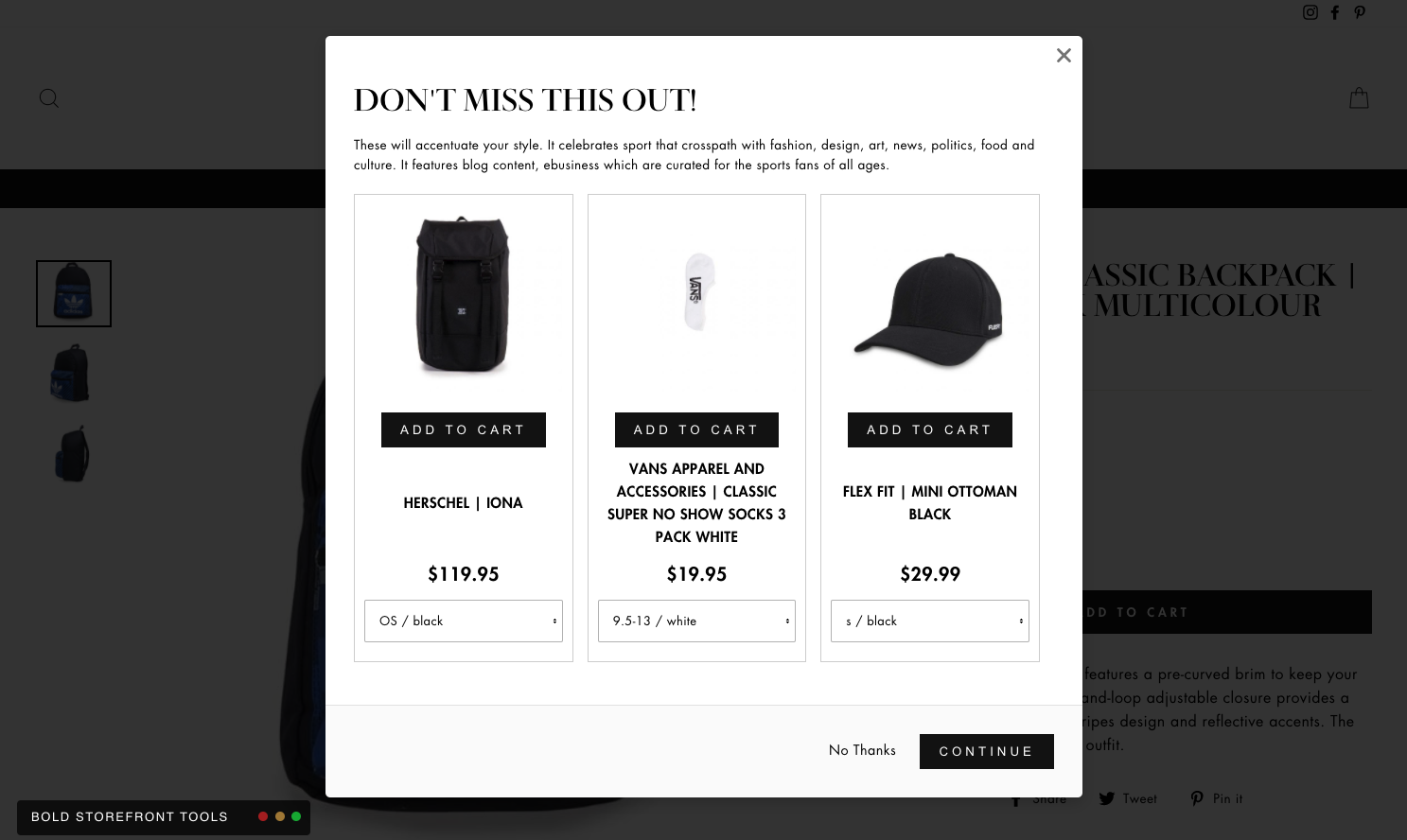
Impulse
Setup
To apply this template on your store, please follow these steps:
From Shopify's admin, select Online Store.
Click the three dots (...) next to your theme, and select Edit code.
Expand the Assets folder.
Click on the New File icon.
Name the file bold-custom.css.
.bold-upsell__intro-heading {
  font-size: calc(var(--typeHeaderSize)*0.85);
  font-family: var(--typeHeaderPrimary),var(--typeHeaderFallback);
  font-weight: var(--typeHeaderWeight);
  letter-spacing: var(--typeHeaderSpacing);
  line-height: var(--typeHeaderLineHeight);
  margin: 0 0 15px;
  display: block;
  margin-block-start: 0.67em;
  margin-block-end: 0.67em;
  margin-inline-start: 0px;
  margin-inline-end: 0px;
}
.bold-upsell__intro-content {
    display: block;
    margin-block-start: 1em;
    margin-block-end: 1em;
    margin-inline-start: 0px;
    margin-inline-end: 0px;
    margin-bottom: 0;
    text-align: left;
    font-weight: var(--typeBaseWeight);
    -webkit-font-smoothing: antialiased;
    -webkit-text-size-adjust: 100%;
    text-rendering: optimizeSpeed;
    font-size: var(--typeBaseSize);
    font-family: var(--typeBasePrimary),var(--typeBaseFallback);
    font-size: calc(var(--typeBaseSize)*0.85);
    letter-spacing: var(--typeBaseSpacing);
    line-height: var(--typeBaseLineHeight);
    margin: 0px 0px 5px 0px;
}
.bold-product__button, .bold-product__button:link, .bold-product__button:visited, .bold_product__button:hover, .bold_product__button:active, .bold_product__button:focus,
.bold-upsell__button--primary:link, .bold-upsell__button--primary:visited, .bold-upsell__button--primary:hover, .bold-upsell__button--primary:active, .bold-upsell__button--primary:focus {
    line-height: 1.42;
    text-decoration: none;
    text-align: center;
    white-space: normal;
    font-size: max(calc(var(--typeBaseSize) - 4px), 13px);
    font-weight: 700;
    text-transform: uppercase;
    letter-spacing: 0.3em;
    display: inline-block;
    padding: 11px 20px;
    margin: 0;
    width: auto;
    min-width: 90px;
    vertical-align: middle;
    cursor: pointer;
    border: 1px solid transparent;
    -webkit-user-select: none;
    -ms-user-select: none;
    user-select: none;
    -webkit-appearance: none;
    -moz-appearance: none;
    border-radius: var(--buttonRadius);
    color: var(--colorBtnPrimaryText);
    background: var(--colorBtnPrimary);
    border: none;
    display: inline-block;
    text-rendering: optimizeSpeed;
    font-family: var(--typeBasePrimary),var(--typeBaseFallback);
    -webkit-writing-mode: horizontal-tb !important;
    word-spacing: normal;
    text-indent: 0px;
    text-shadow: none;
    font: 400 13.3333px Arial;
}
Click Save.
Expand the Layout folder, and open theme.liquid.
Copy and paste this code directly under the {{ content_for_header }}:
{{ 'bold-custom.css' | asset_url | stylesheet_tag }}Click Save.
Prestige
Setup
To apply this template on your store, please follow these steps:
From Shopify's admin, select Online Store.
Click the three dots (...) next to your theme, and select Edit code.
Expand the Assets folder.
Click on the New File icon.
Name the file bold-custom.css.
.bold-upsell__intro-heading {
    font-family: var(--heading-font-family);
    font-weight: var(--heading-font-weight);
    font-style: var(--heading-font-style);
    color: var(--heading-color);
    transition: color 0.2s ease-in-out;
    margin-bottom: 0;
    letter-spacing: 0.2em;
    text-transform: uppercase;
    font-size: 2em;
}
.bold-product__title_content {
    font-family: var(--heading-font-family);
    font-weight: var(--heading-font-weight);
    font-style: var(--heading-font-style);
    color: var(--heading-color);
    transition: color 0.2s ease-in-out;
    margin-bottom: 0;
    letter-spacing: 0.2em;
    text-transform: uppercase;
    font-size: 1em;
}
.bold-upsell__intro {
    margin: 0px 0px 5px 0px;
    font-size: 1.10em;
    font-weight: inherit;
    font-family: var(--text-font-family);
    font-style: var(--text-font-style);
    color: var(--text-color);
    line-height: 1.65;
}
.bold-product__button, .bold-product__button:link, .bold-product__button:visited, .bold_product__button:hover, .bold_product__button:active, .bold_product__button:focus,
.bold-upsell__button--primary:link, .bold-upsell__button--primary:visited, .bold-upsell__button--primary:hover, .bold-upsell__button--primary:active, .bold-upsell__button--primary:focus {
    display: flex;
    align-items: center;
    justify-content: center;
    border-color: var(--button-background);
    text-decoration: none;
    color: white;
    background-color: black;
    -webkit-appearance: button;
    cursor: pointer;
    position: relative;
    padding: 14px 28px;
    line-height: normal;
    border: 1px solid transparent;
    border-radius: 0;
    text-transform: uppercase;
    font-size: calc(var(--base-text-font-size) - (var(--default-text-font-size) - 12px));
    text-align: center;
    letter-spacing: 0.2em;
    font-family: var(--heading-font-family);
    font-weight: var(--heading-font-weight);
    font-style: var(--heading-font-style);
    transition: color 0.45s cubic-bezier(0.785, 0.135, 0.15, 0.86), border 0.45s cubic-bezier(0.785, 0.135, 0.15, 0.86);
    z-index: 1;
    -webkit-tap-highlight-color: initial;
}
.bold-upsell__button--primary:link, .bold-upsell__button--primary:visited, .bold-upsell__button--primary:hover, .bold-upsell__button--primary:active, .bold-upsell__button--primary:focus {
    width: fit-content;
    display: inline-flex;
}
.bold-product__price.current_price {
    line-height: 1.3;
    color: var(--text-color-light);
    font-family: var(--heading-font-family);
    font-weight: var(--heading-font-weight);
    font-style: var(--heading-font-style);
    transition: color 0.2s ease-in-out;
    letter-spacing: 0.2em;
    display: inline-block;
    font-size: 1.25em;
}
Click Save.
Expand the Layout folder, and open theme.liquid.
Copy and paste this code directly under the {{ content_for_header }}:
{{ 'bold-custom.css' | asset_url | stylesheet_tag }}Click Save.
Turbo
Setup
To apply this template on your store, please follow these steps:
From Shopify's admin, select Online Store.
Click the three dots (...) next to your theme, and select Edit code.
Expand the Assets folder.
Click on the New File icon.
Name the file bold-custom.css.
.bold-product__button,
.bold-product__button:link,
.bold-product__button:visited,
.bold_product__button:hover,
.bold_product__button:active,
.bold_product__button:focus,
.bold-upsell__button--primary:link,
.bold-upsell__button--primary:visited,
.bold-upsell__button--primary:hover,
.bold-upsell__button--primary:active,
.bold-upsell__button--primary:focus {
    min-height: 44px;
    margin-bottom: 0;
    height: 100%;
    position: relative;
    display: inline-block;
    width: 100%;
    margin-bottom: 0px;
    background: #03a196;
    color: #ffffff;
    border: 1px solid #03a196;
    padding: 0 20px;
    text-align: center;
    cursor: pointer;
    line-height: 1.2;
    vertical-align: top;
    font-family: Oswald, sans-serif;
    font-weight: normal;
    font-style: normal;
    font-size: 14px;
    text-transform: uppercase;
    letter-spacing: 1px;
    display: -webkit-inline-box;
    display: -webkit-inline-flex;
    display: -moz-inline-flex;
    display: -ms-inline-flexbox;
    display: inline-flex;
    -webkit-align-items: center;
    -moz-align-items: center;
    -ms-align-items: center;
    align-items: center;
    -webkit-justify-content: center;
    -moz-justify-content: center;
    -ms-justify-content: center;
    justify-content: center;
    -ms-flex-pack: center;
    transition: all 0.2s linear;
    -webkit-appearance: none;
    -webkit-font-smoothing: antialiased;
    -moz-osx-font-smoothing: grayscale;
    border-radius: 0;
}
.bold-upsell__intro-heading {
    font-family: Oswald, sans-serif;
    font-weight: 300;
    font-style: normal;
    font-size: 2em;
    text-transform: uppercase;
    line-height: 1.5;
    color: #333333;
    display: block;
    letter-spacing: .1em;
    text-rendering: optimizeLegibility;
    -moz-osx-font-smoothing: grayscale;
    margin: 0 auto 15px;
    clear: both;
    padding-top: .5em;
}
.bold-upsell__intro-content {
    margin: 0px 0px .25em 0px;
    display: block;
    margin-block-start: 1em;
    margin-block-end: 1em;
    margin-inline-start: 0px;
    margin-inline-end: 0px;
    font-family: Roboto, sans-serif;
    font-weight: 400;
    font-style: normal;
    font-size: 15px;
    text-transform: none;
    color: #333333;
    line-height: 1.6em;
    overflow: auto;
    -moz-osx-font-smoothing: grayscale;
    background-color: #ffffff;
    overflow-wrap: anywhere;
    -moz-box-sizing: border-box;
    -webkit-box-sizing: border-box;
    box-sizing: border-box;
}
.bold-product__title_content {
    display: block;
    text-align: left;
    margin-bottom: 0.25em;
    font-weight: bold;
    font-family: Roboto, sans-serif;
    font-style: normal;
    font-size: 1em;
    text-transform: none;
    color: #333333;
    line-height: 1.6em;
    overflow: auto;
    -webkit-font-smoothing: antialiased;
    -moz-osx-font-smoothing: grayscale;
    background-color: #ffffff;
    overflow-wrap: anywhere;
}
.bold-upsell__button--primary:link,
.bold-upsell__button--primary:visited,
.bold-upsell__button--primary:hover,
.bold-upsell__button--primary:active,
.bold-upsell__button--primary:focus {
    width: fit-content;
}
.bold-upsell__button--secondary {
    vertical-align: -webkit-baseline-middle;
    font-weight: 800;
    text-transform: uppercase;
}
.bold-product {
    border-color: #000;
    box-shadow: 0px 0px 0px 2px #fff;
    -webkit-transform: translateZ(0);
    -webkit-font-smoothing: antialiased;
    -moz-osx-font-smoothing: grayscale;
    position: relative;
}
.bold-product__variant-selector {
    border-color: darkgrey;
    box-shadow: 0px 0px 0px 2px #fff;
    -webkit-transform: translateZ(0);
    -webkit-font-smoothing: antialiased;
    -moz-osx-font-smoothing: grayscale;
    position: relative;
}
.bold-modal__window {
  border-radius: 0px;
}
.bold-modal__btn-close {
  top: 1em;
  right: 1em;
}
Click Save.
Expand the Layout folder, and open theme.liquid.
Copy and paste this code directly under the {{ content_for_header }}:
{{ 'bold-custom.css' | asset_url | stylesheet_tag }}Click Save.
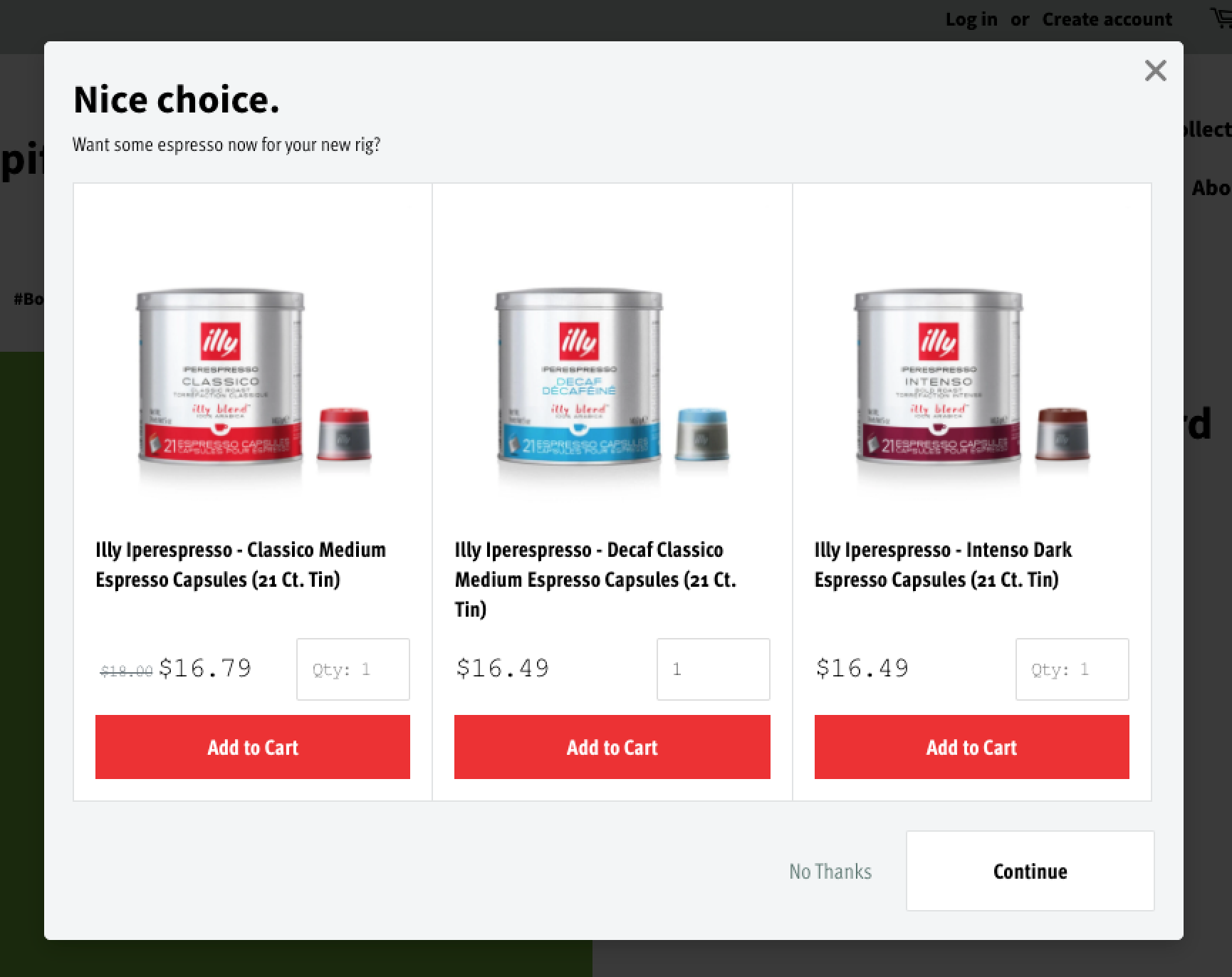
CSS Design Inspirations
Clean
Setup
To apply this template on your store, please follow these steps:
From Shopify's admin, select Online Store.
Click the three dots (...) next to your theme, and select Edit code.
Expand the Assets folder.
Click on the New File icon.
Name the file bold-custom.css.
.bold-modal {
font-family: "ff-meta-web-pro-condensed",sans-serif;
}

.bold-modal__window {}

.bold-modal__btn-close {}

.bold-modal__btn-close:hover {}

.bold-modal__header {}

.bold-modal__content {
background-color: #f3f5f6;
padding: 20px;
margin: -30px -30px 0;
}

.bold-modal_header .bold-modal_content {}

.bold-modal__content:last-child {}

.bold-modal__footer {
background: #f3f5f6;
border: 0;
padding: 0 20px 20px;
}

/* Showing and Hiding the Modal */
div.bold-modal--is-showing {}

div.bold-modal--is-showing .bold-modal {}

/* Transitions and Animations */
.bold-modal--animated {}

.bold-modal--animated .bold-modal__window {}

div.bold-modal-is-showing .bold-modal-animated {}

div.bold-modal-is-showing .bold-modal-animated .bold-modal__window {}

@media only screen and (min-width: 499px) {
.bold-modal {}

.bold-modal__window {}

.bold-modal--animated {}

.bold-modal--animated .bold-modal__window {}
}

@media only screen and (min-width: 879px) {
.bold-modal__window {}
}

/* bold.grid.css */
.bold-grid {}

.bold-grid:after {}

.bold-grid__column {
padding: 0 !important;
}

.bold-grid .bold-grid__column:nth-child(2),
.bold-grid .bold-grid__column:nth-child(3){
margin-left: -1px;
}

@media only screen and (min-width: 499px) {
.bold-grid__column {}

.bold-grid__column--half,
.bold-grid__column--third,
.bold-grid__column--quarter {}

.bold-grid__column--third:first-child {}
}

@media only screen and (min-width: 599px) {
.bold-grid__column--third,
.bold-grid__column--third:first-child {}
}

@media only screen and (min-width: 739px) {
.bold-grid__column--quarter {}
}
/* bold.grid.css */

/* bold.product.css */
.bold-product {
border-color: #e1e3e4;
}

.bold-product__image-container {
order: 1;
}

.bold-product__image {}

.bold-product__control {}

.bold-product__variant-selector {}
/* bold.product.css */

/* bold.upsell.css */
.bold-upsell {}

.bold-upsell__intro {}

.bold-upsell__products-list {}

.bold-upsell_products-list .bold-grid_column {}

.bold-upsell__actions {}

.bold-upsell__button {}
/* bold.upsell.css */

/* =============================================================================
MODAL STYLES
============================================================================= */
.bold-modal {}

.bold-modal__window {

}

.bold-modal__header {}

.bold-modal__footer {}

/* =============================================================================
UPSELL STYLES
============================================================================= */
.bold-upsell {}

.bold-upsell__intro {
outline: 0;
}

.bold-upsell__intro-heading {
font-size: 28px;
line-height: 1.43;
font-weight: 400;
}

.bold-upsell__intro-content {
font-size: 14px;
margin-bottom: 20px !important;
}

.bold-upsell__button--primary:link,
.bold-upsell__button--primary:visited,
.bold-upsell__button--primary:hover,
.bold-upsell__button--primary:active,
.bold-upsell__button--primary:focus {}

.bold-upsell__button--primary {
font-size: 15px;
padding: 15px;
font-weight: 600;
background: #fff;
min-width: 175px;
text-align: center;
border-color: #e1e3e4;
}

.bold-upsell__button--primary:hover {}

.bold-upsell__button--primary:active {}

.bold-upsell__button--secondary {}

/* =============================================================================
PRODUCT STYLES
============================================================================= */
.bold-product {
display: flex;
flex-wrap: wrap;
padding: 15px;
background: #fff;
}

.bold-product.bold-grid {}

.bold-product__info,
.bold-product__variants,
.bold-product__actions {}

.bold-product__pricing {
float: left;
margin: 9px 0;
max-width: calc(100% - 80px);
text-align: left;
}

.bold-product__title {
font-weight: 600;
align-items: flex-start;
text-align: left;
font-size: 15px;
line-height: 21px;
}

.bold-product__description {}

.bold-product__price {
font-family: "Courier New", Courier, monospace;
font-weight: 300;
font-size: 20px;
color: #000;
letter-spacing: -1px;
}

.bold-product__price--deleted {
opacity: 1;
color: #677279;
font-size: 60%;
}

.bold-product__control {}

.bold-product__quantity-field {
margin: 0 !important;
height: 44px;
padding: 0 10px;
font-family: "Courier New", Courier, monospace;
letter-spacing: -1px;
}

.bold-product__variant-selector {}

.bold-product__actions {
order: 3;
width: 100%;
}

.bold-product__details {
order: 1;
}

.qty_container {
float: right;
max-width: 80px;
}

.bold-product__button,
.bold-product__button:link,
.bold-product__button:visited,
.bold_product__button:hover,
.bold_product__button:active,
.bold_product__button:focus {
border: 0;
background: #ee302c;
color: #fff;
font-size: 15px;
font-weight: 800;
border-radius: 0;
}

.bold-product__button:hover {
opacity: 0.8;
}

.bold-product__button:active {}
Click Save.
Expand the Layout folder, and open theme.liquid.
Copy and paste this code directly under the {{ content_for_header }}:
{{ 'bold-custom.css' | asset_url | stylesheet_tag }}Click Save.
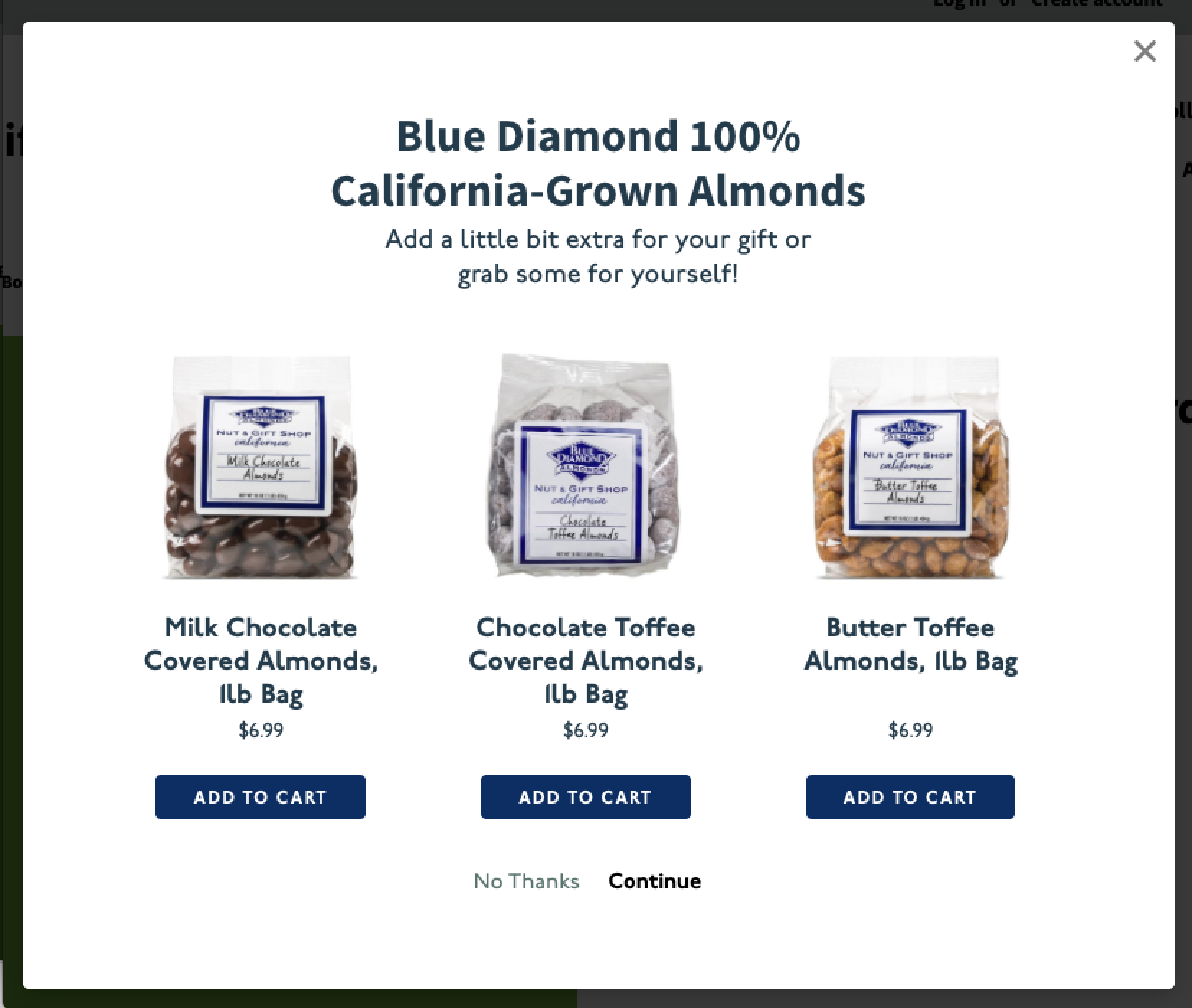
Centered Alignment
Setup
To apply this template on your store, please follow these steps:
From Shopify's admin, select Online Store.
Click the three dots (...) next to your theme, and select Edit code.
Expand the Assets folder.
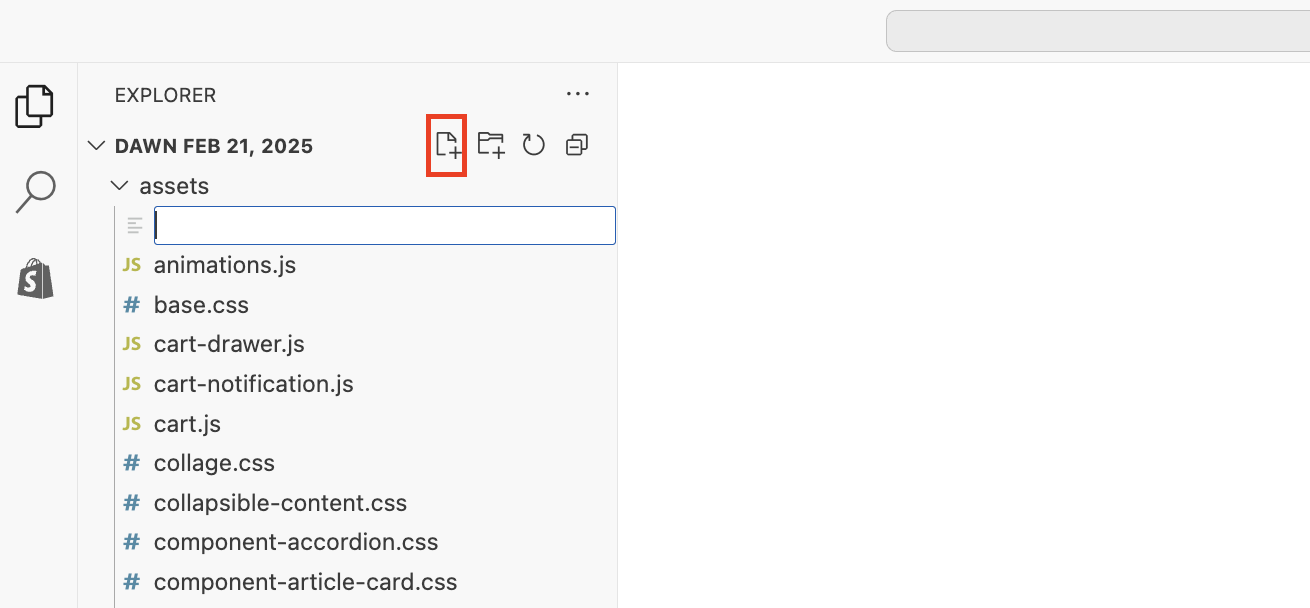
Click on the New File icon.
Name the file bold-custom.css.
.bold-modal {
font-family: "p22-underground", sans-serif;
}

.bold-modal__window {}

.bold-modal__btn-close {}

.bold-modal__btn-close:hover {}

.bold-modal__header {}

.bold-modal__content {
background-color: #fff;
padding: 60px 60px 0;
margin: -30px -30px 0;
}

.bold-modal_header .bold-modal_content {}

.bold-modal__content:last-child {}

.bold-modal__footer {
background: #fff;
border: 0;
padding: 0 0 60px;
text-align: center;
}

/* Showing and Hiding the Modal */
div.bold-modal--is-showing {}

div.bold-modal--is-showing .bold-modal {}

/* Transitions and Animations */
.bold-modal--animated {}

.bold-modal--animated .bold-modal__window {}

div.bold-modal-is-showing .bold-modal-animated {}

div.bold-modal-is-showing .bold-modal-animated .bold-modal__window {}

@media only screen and (min-width: 499px) {
.bold-modal {}

.bold-modal__window {}

.bold-modal--animated {}

.bold-modal--animated .bold-modal__window {}
}

@media only screen and (min-width: 879px) {
.bold-modal__window {}
}

/* bold.grid.css */
.bold-grid {}

.bold-grid:after {}

.bold-grid__column {}

.bold-grid .bold-grid__column:nth-child(2),
.bold-grid .bold-grid__column:nth-child(3){
margin-left: -1px;
}

@media only screen and (min-width: 499px) {
.bold-grid__column {}

.bold-grid__column--half,
.bold-grid__column--third,
.bold-grid__column--quarter {}

.bold-grid__column--third:first-child {}
}

@media only screen and (min-width: 599px) {
.bold-grid__column--third,
.bold-grid__column--third:first-child {}
}

@media only screen and (min-width: 739px) {
.bold-grid__column--quarter {}
}
/* bold.grid.css */

/* bold.product.css */
.bold-product {
border-color: #e1e3e4;
}

.bold-product__image-container {
order: 1;
}

.bold-product__image {}

.bold-product__control {}

.bold-product__variant-selector {}
/* bold.product.css */

/* bold.upsell.css */
.bold-upsell {}

.bold-upsell__intro {}

.bold-upsell__products-list {}

.bold-upsell_products-list .bold-grid_column {}

.bold-upsell__actions {}

.bold-upsell__button {}
/* bold.upsell.css */

/* =============================================================================
MODAL STYLES
============================================================================= */
.bold-modal {}

.bold-modal__window {

}

.bold-modal__header {}

.bold-modal__footer {}

/* =============================================================================
UPSELL STYLES
============================================================================= */
.bold-upsell {}

.bold-upsell__intro {
outline: 0;
color: #223b4c;
text-align: center;
}

.bold-upsell__intro-heading {
font-size: 32px;
line-height: 38px;
font-weight: 400;
max-width: 400px;
margin: 0 auto;
}

.bold-upsell__intro-content {
font-size: 18px;
line-height: 24px;
margin-bottom: 20px !important;
max-width: 300px;
margin: 5px auto 0 !important;
}

.bold-upsell__button {
margin: 0 15px;
}

.bold-upsell__button--primary:link,
.bold-upsell__button--primary:visited,
.bold-upsell__button--primary:hover,
.bold-upsell__button--primary:active,
.bold-upsell__button--primary:focus {}

.bold-upsell__button--primary {
font-size: 15px;
padding: 0;
font-weight: 600;
background: #fff;
border: 0;
}

.bold-upsell__button--primary:hover {}

.bold-upsell__button--primary:active {}

.bold-upsell__button--secondary {
margin: 0;
}

/* =============================================================================
PRODUCT STYLES
============================================================================= */
.bold-product {
background: none;
display: flex;
flex-wrap: wrap;
padding: 15px;
border: 0;
}

.bold-product.bold-grid {}

.bold-product__info {
margin-bottom: 0;
}

.bold-product__info,
.bold-product__variants,
.bold-product__actions {}

.bold-product__pricing {
margin: 2px 0 0;
}

.bold-product__title {
font-weight: 600;
align-items: flex-start;
text-align: center;
font-size: 19px;
line-height: 23px;
color: #223b4c;
}

.bold-product__description {}

.bold-product__price {
font-family: "p22-underground", sans-serif;
font-weight: 400;
font-size: 14px;
color: #223b4c;
}

.bold-product__price--deleted {
opacity: 1;
color: #677279;
font-size: 60%;
}

.bold-product__control {}

.bold-product__quantity-field {}

.bold-product__variant-selector {}

.bold-product__actions {
order: 3;
width: 100%;
}

.bold-product__details {
order: 1;
width: 100%;
}

.qty_container {}

.bold-product__button,
.bold-product__button:link,
.bold-product__button:visited,
.bold_product__button:hover,
.bold_product__button:active,
.bold_product__button:focus {
display: inline-block;
border: 1px solid #092d65;
background: #092d65;
color: #fff;
font-size: 12px;
font-weight: 800;
text-transform: uppercase;
letter-spacing: 1.5px;
padding: 10px 25px 7px;
border-radius: 4px;
transition: all 0.2s;
}

.bold-product__button:hover {
background: #fff;
color: #092d65;
}

.bold-product__button:active {}
Click Save.
Expand the Layout folder, and open theme.liquid.
Copy and paste this code directly under the {{ content_for_header }}:
{{ 'bold-custom.css' | asset_url | stylesheet_tag }}Click Save.
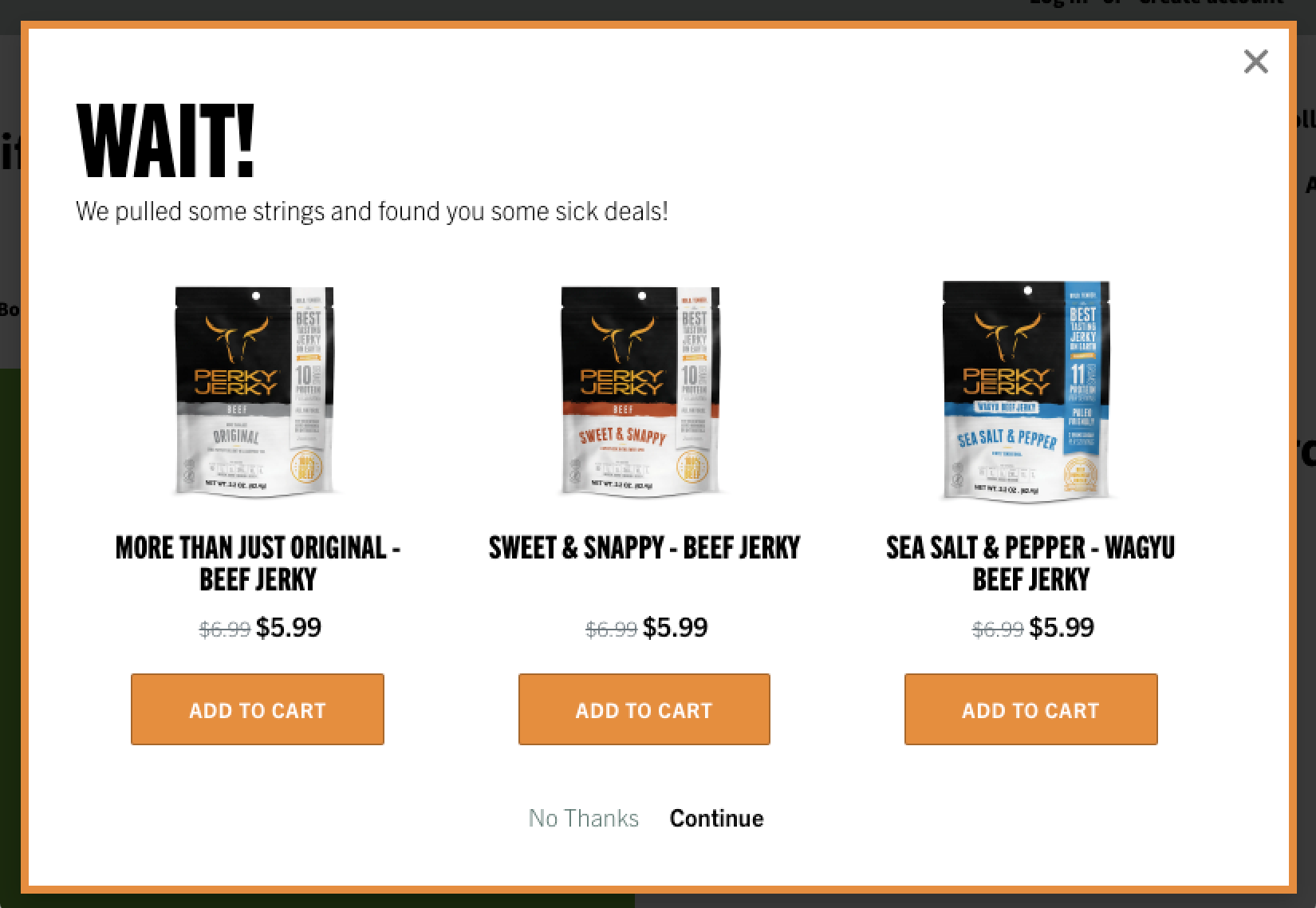
Branded Buttons & Borders
Setup
To apply this template on your store, please follow these steps:
From Shopify's admin, select Online Store.
Click the three dots (...) next to your theme, and select Edit code.
Expand the Assets folder.
Click on the New File icon.
Name the file bold-custom.css.
.bold-modal {
font-family: "trade-gothic-next", sans-serif;
}

.bold-modal__window {
border-radius: 0;
border: 5px solid #e78e34;
}

.bold-modal__btn-close {}

.bold-modal__btn-close:hover {}

.bold-modal__header {}

.bold-modal__content {
background-color: #fff;
padding: 30px 30px 0;
margin: -30px -30px 0;
}

.bold-modal_header .bold-modal_content {}

.bold-modal__content:last-child {}

.bold-modal__footer {
background: #fff;
border: 0;
padding: 0 0 30px;
text-align: center;
}

/* Showing and Hiding the Modal */
div.bold-modal--is-showing {}

div.bold-modal--is-showing .bold-modal {}

/* Transitions and Animations */
.bold-modal--animated {}

.bold-modal--animated .bold-modal__window {}

div.bold-modal-is-showing .bold-modal-animated {}

div.bold-modal-is-showing .bold-modal-animated .bold-modal__window {}

@media only screen and (min-width: 499px) {
.bold-modal {}

.bold-modal__window {}

.bold-modal--animated {}

.bold-modal--animated .bold-modal__window {}
}

@media only screen and (min-width: 879px) {
.bold-modal__window {}
}

/* bold.grid.css */
.bold-grid {}

.bold-grid:after {}

.bold-grid__column {}

.bold-grid .bold-grid__column:nth-child(2),
.bold-grid .bold-grid__column:nth-child(3){
margin-left: -1px;
}

@media only screen and (min-width: 499px) {
.bold-grid__column {}

.bold-grid__column--half,
.bold-grid__column--third,
.bold-grid__column--quarter {}

.bold-grid__column--third:first-child {}
}

@media only screen and (min-width: 599px) {
.bold-grid__column--third,
.bold-grid__column--third:first-child {}
}

@media only screen and (min-width: 739px) {
.bold-grid__column--quarter {}
}
/* bold.grid.css */

/* bold.product.css */
.bold-product {
border-color: #e1e3e4;
}

.bold-product__image-container {
order: 1;
max-width: 150px !important;
max-height: 150px !important;
padding-bottom: 150px !important;
}

.bold-product__image {}

.bold-product__control {}

.bold-product__variant-selector {}
/* bold.product.css */

/* bold.upsell.css */
.bold-upsell {}

.bold-upsell__intro {}

.bold-upsell__products-list {}

.bold-upsell_products-list .bold-grid_column {}

.bold-upsell__actions {}

.bold-upsell__button {}
/* bold.upsell.css */

/* =============================================================================
MODAL STYLES
============================================================================= */
.bold-modal {}

.bold-modal__window {
border-radius: 0;
}

.bold-modal__header {}

.bold-modal__footer {}

/* =============================================================================
UPSELL STYLES
============================================================================= */
.bold-upsell {}

.bold-upsell__intro {
outline: 0;
color: #000;
text-align: left;
margin: 0;
}

.bold-upsell__intro-heading {
font-family: "trade-gothic-next-compressed", sans-serif;
font-size: 64px;
line-height: 72px;
font-weight: 400;
text-transform: uppercase;
margin: 0 auto;
}

.bold-upsell__intro-content {
font-size: 16px;
line-height: 22px;
margin-bottom: 20px !important;
margin: 0 auto !important;
}

.bold-upsell__button {
margin: 0 15px;
}

.bold-upsell__button--primary:link,
.bold-upsell__button--primary:visited,
.bold-upsell__button--primary:hover,
.bold-upsell__button--primary:active,
.bold-upsell__button--primary:focus {}

.bold-upsell__button--primary {
font-size: 15px;
padding: 0;
font-weight: 600;
background: #fff;
border: 0;
}

.bold-upsell__button--primary:hover {}

.bold-upsell__button--primary:active {}

.bold-upsell__button--secondary {
margin: 0;
}

/* =============================================================================
PRODUCT STYLES
============================================================================= */
.bold-product {
background: none;
display: flex;
flex-wrap: wrap;
padding: 15px;
border: 0;
}

.bold-product.bold-grid {}

.bold-product__info {
margin-bottom: 0;
}

.bold-product__info,
.bold-product__variants,
.bold-product__actions {}

.bold-product__pricing {
margin: 10px 0 0;
}

.bold-product__title {
font-family: "trade-gothic-next-compressed", sans-serif;
font-weight: 600;
align-items: flex-start;
text-align: center;
font-size: 20px;
line-height: 20px;
color: #000;
text-transform: uppercase;
}

.bold-product__description {}

.bold-product__price {
font-size: 16px;
color: #000;
}

.bold-product__price--deleted {
opacity: 1;
color: #677279;
font-size: 80%;
}

.bold-product__control {}

.bold-product__quantity-field {}

.bold-product__variant-selector {}

.bold-product__actions {
order: 3;
width: 100%;
}

.bold-product__details {
order: 1;
width: 100%;
}

.qty_container {}

.bold-product__button,
.bold-product__button:link,
.bold-product__button:visited,
.bold_product__button:hover,
.bold_product__button:active,
.bold_product__button:focus {
display: inline-block;
background: #e78f34;
color: #fff;
font-size: 13px;
font-weight: 800;
text-transform: uppercase;
letter-spacing: .5px;
padding: 15px 35px;
transition: all 0.2s;
}

.bold-product__button:hover {
background: #000;
}

.bold-product__button:active {}
Click Save.
Expand the Layout folder, and open theme.liquid.
Copy and paste this code directly under the {{ content_for_header }}:
{{ 'bold-custom.css' | asset_url | stylesheet_tag }}Click Save.