
Upsell: Bold App Integrations
Upsell & Bold Discounts
Upsell integrates with Bold Discounts to give you the ability to create Buy One, Get One (BOGO) offers on your site.
Discounts' Duplicate & Hide feature creates duplicate, discounted versions of your store's products that are hidden from the storefront. These hidden products can be offered through Upsell when certain conditions are met. This ensures that the items cannot be purchased on their own, and that the customer must qualify for the discounted item(s) first.
Upsell allows you to set conditions for when this product is offered. You can have the hidden discounted item(s) display when a specific product is added to the cart, when the customer is checking out with certain items, or when the customer's cart is within a defined price range.
For more information on creating a BOGO offer using Upsell and Discounts, please visit Upsell & Bold Discounts Integration.
Upsell & Bold Subscriptions for Shopify Checkout
Upsell integrates with Bold Subscriptions for Shopify Checkout to help you create unique offers that help to both increase your average order value and lifetime customer value. With both apps together, you can create the following types of offers:
Upsell a subscription to a customer looking to purchase one time.
Show product offers to your existing subscribers in the customer portal.
Email product offers to existing subscribers.
Offer one-time purchases to customers who are purchasing a subscription.
For more information about the different kinds of offers you can set up with this integration, please visit Bold Upsell & Bold Subscriptions Integration.
Upsell & Bold Custom Pricing
Upsell integrates with Bold Custom Pricing to allow you to display customer-specific pricing on product offers in the Upsell pop-up modal.
Note: This integration is only compatible with Custom Pricing Accelerated Method (Version 3). For more information about the different versions, please visit Discount Methods and How to Switch.
Custom Pricing V3 displays customer-specific discounts in the Upsell modal when using the Product Page Pop-up and Cart Page Pop-up trigger locations only. Customers must be logged in prior to triggering an offer in order to see the discounts specific to them. Customers who are not logged in or do not have a Custom Pricing tag, will be offered the product at full price.
For more information about Custom Pricing, please visit Custom Pricing Overview & Pricing.
Upsell & Bold Bundles
Upsell can work alongside Bold Bundles on the same store, however, both apps do not have an official integration with each other and may have some conflicts.
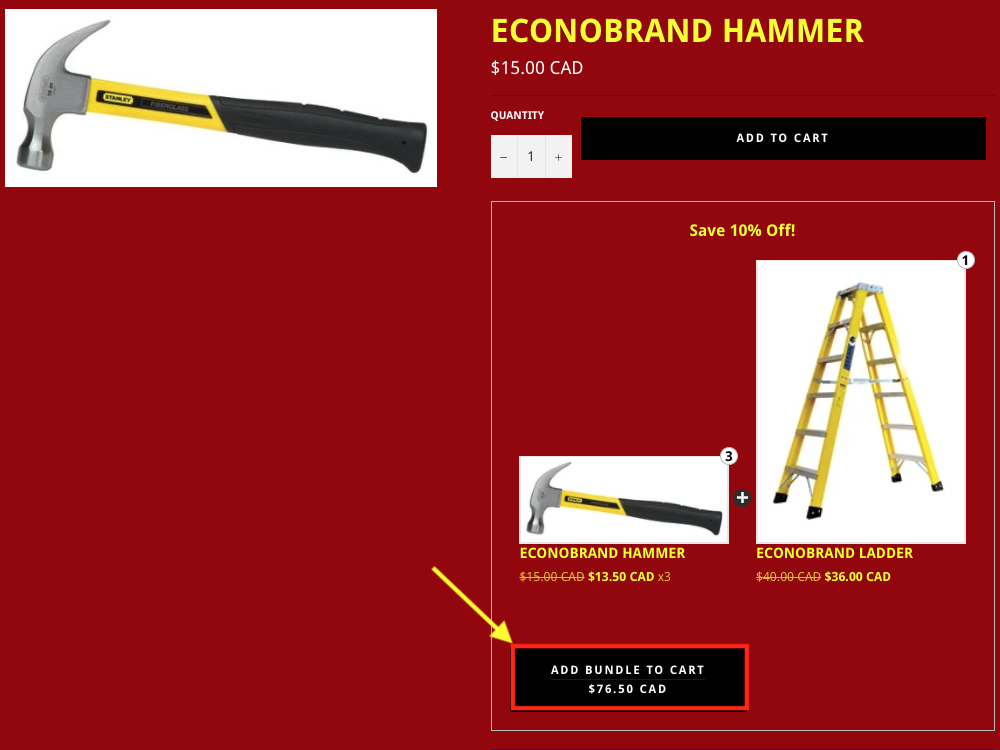
When a bundle widget exists on a product page, the customer will need to select the Add to Cart button in the bundle widget on the product page in order for all of the products in the bundle to add into the cart:
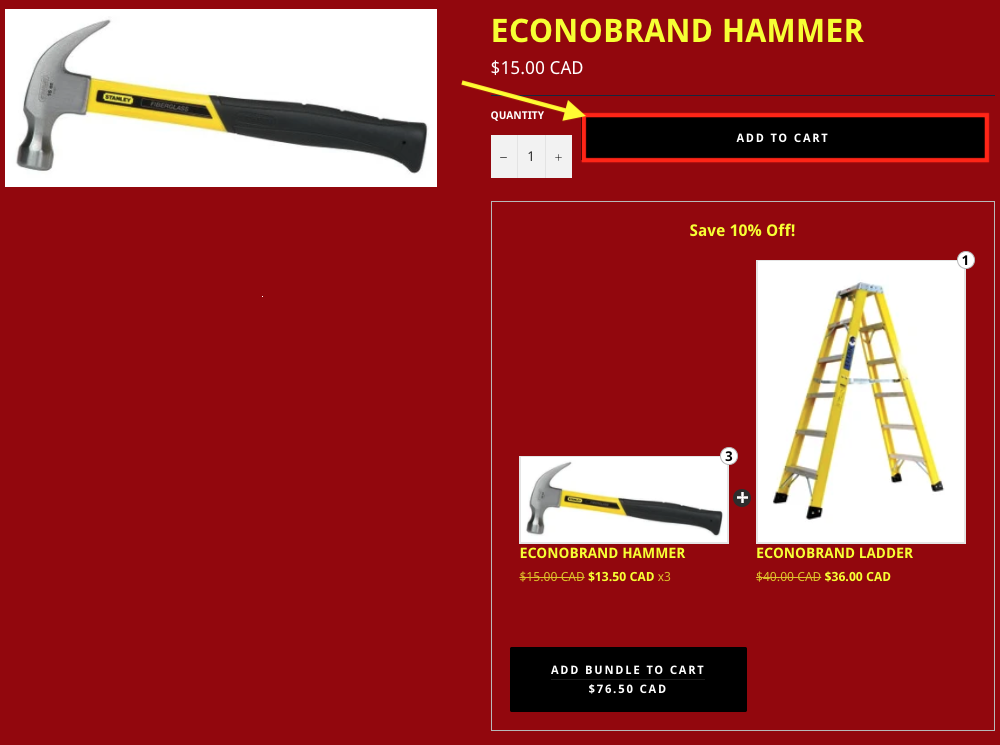
The bundle's Add to Cart button does not trigger the Upsell pop-up modal, only the Add to Cart button on the product page outside of the bundle widget can trigger the Upsell pop-up modal:
Combo products can be included as offer products in both upsell and cross-sell offers only for Add to Cart offers. When a combo product is accepted either in a cross-sell or upsell group, the products that make up the combo product in Bundles are added along with the trigger product, or replace the trigger product.
Note: If Bundles and Upsell are both used on the same store for the same products, it would be best to only use Product Page Pop-up offers on products that are also tied to bundle groups. If a combo product is used as an offer product in a Cart Page Pop-up offer, the combo product does not replace the products that make up the combo product. This can cause inventory issues on your store.