
Bold Upsell Pricing & Overview
Bold Upsell allows you to offer additional products or product upgrades to your customers to enhance your customers' experience and increase your average order value (AOV). With Bold Upsell, you can manually curate your offers based on the products your customer are already interested in purchasing, or use Smart Offers to leverage AI and automatically curate the best selling offers for your store.
There are several locations where you can present offers to your customers, such as:
When the add to cart button from the product page is selected.
When the checkout button is selected from the cart.
A location of your choice in the Cart Drawer.
In-Checkout, before they've completed their purchase in the Shopify checkout.
Post Purchase Pop-up, after they've completed their purchase in the Shopify checkout.
Post Purchase Email, sent via email immediately after they've completed their purchase.
If you also have Subscriptions for Shopify Checkout on your store, the following offers can be created:
Customer Portal Upsells
Subscription Email Upsells
Upsell a Subscription
Please note that third party checkout buttons such as PayPal, Google Pay, etc., do not trigger offers on the product or cart page. However, these payment methods can still be offered in the checkout.
View each section to learn more about Upsell. When you are ready, visit Set up Bold Upsell.
Availability & installation
Bold Upsell is available via the Shopify app store. You can download it to your store using the following link:
Upsell is easily installed to your theme by enabling the necessary app embeds in your theme. Once Upsell is downloaded to your store, you can follow along with the in-app setup guide. If you prefer to install Upsell manually, please visit our Installation Guide for Bold Upsell.
Pricing
Upsell comes with a 14-day free trial period for all new users on the Standard and Complete plans.
Note: All plans are available for free for development and sandbox stores.
New pricing effective October 6, 2025
Upsell offers several new plans to better align with your store’s growth. Each plan includes access to a powerful set of features, and pricing scales automatically based on the number of monthly Upsell offer views. For most offers, a view is counted every time a customer sees an Upsell offer, regardless of whether they accept or decline it. Read more about Upsell views.
SmartFlex billing
Your Upsells will always remain active and visible to customers, ensuring uninterrupted service. Based on the number of Upsell offers viewed per month, you may be moved to a higher SmartFlex Tier. This new tier fee is added to your monthly plan fee until you manually reset your plan.
See Upsell's SmartFlex pricing in action.
Example
The total monthly fee is the sum of your Plan Price and any applicable SmartFlex Tier fee.
Scenario:
You are on the Standard plan at $25/month.
750 Upsell offers are viewed in the current month.
SmartFlex Tier (501–1,000 views) applies at $25/month.
Your total fee going forward is $50 ($25 plan fee + $25 SmartFlex Tier).
The above fees may be prorated based on your Shopify billing cycle. Read more about how to understand Upsell's app fees on your Shopify bill.
The Essential plan allows stores with less than 50 orders per month to get started for free. As your store grows to over 50 orders in a month, you are then converted to the Standard plan going forward.
The Enterprise plan offers unlimited views and access to all features at no additional charge.
Plan feature and price chart
The table below outlines the price of each plan and the features included in each plan.
Essential | Standard | Complete | Enterprise | |
|---|---|---|---|---|
Plan price | Free | $25/mo | $50/mo | $500/mo (billed $6000/yr) |
Plan auto upgrades | Free below 50 orders/mo then converts to Standard plan | Above 500 views/mo then SmartFlex billing applies | Above 500 views/mo then SmartFlex billing applies | No usage fees, ever |
Unlimited offer creation | ✔ | ✔ | ✔ | ✔ |
AI Smart Offers | ✔ | ✔ | ✔ | ✔ |
Product Page offers | ✔ | ✔ | ✔ | ✔ |
Basic reporting | ✔ | ✔ | ✔ | ✔ |
Advanced reporting |
| ✔ | ✔ | ✔ |
Custom Cross-sells and Upsells | ✔ | ✔ | ✔ | ✔ |
Cart Page offers | ✔ | ✔ | ✔ | ✔ |
Cart Drawer offers | ✔ | ✔ | ✔ | ✔ |
Post-Purchase Pop-Up offers |
| ✔ | ✔ | ✔ |
Post-Purchase Email Upsells |
| ✔ | ✔ | ✔ |
Customer Portal Upsells |
| ✔ | ✔ | ✔ |
Subscription Email Upsells |
| ✔ | ✔ | ✔ |
Date & spending amount conditions |
| ✔ | ✔ | ✔ |
Funnels |
|
| ✔ | ✔ |
In-Checkout offers |
|
| ✔* | ✔* |
Priority support |
|
| ✔ | ✔ |
*available to Shopify Plus stores only.
SmartFlex Tiers
The table below outlines the number of monthly offer views and associated SmartFlex Tiers that will be added to your plan price. You remain on a tier until you manually reset your plan.
Views per month | SmartFlex Tier |
|---|---|
0-500 | Free |
501-1000 | $25 |
1001-3000 | $50 |
3001-6000 | $75 |
6001-10,000 | $100 |
10,001-30,000 | $150 |
30,001-50,000 | $200 |
50,001-100,000 | $300 |
100,001-150,000 | $400 |
150,001-200,000 | $500 |
+50,000 | +$100 |
Managing your plan
Resetting your plan
If Upsell identifies that your recent views are lower than your current SmartFlex Tier, a message appears on the Account settings page to notify you. If you don't think you will require the number of views in your SmartFlex Tier going forward, you can manually reset your plan back to its base price.
To check if you are eligible for a lower price or reset your plan, please follow the steps below.
Open Upsell, and navigate to Settings > Account Settings.
If you are eligible for a lower price the message is displayed in a blue banner.
Click Reset plan to base price.

Note: You will be moved to a higher SmartFlex Tier again if your offers have more views for that month than what is included in your plan.
Legacy plans
Stores that have installed Upsell before October 6, 2025 are on one of Upsell’s legacy price plans. You can upgrade to a new plan, however, you are not required to do so. If you choose not to upgrade, you will be unable to switch to an alternate legacy plan.
Changing your plan
To change your Upsell plan, please follow the steps below.
Open Upsell, and navigate to Settings > Account Settings.
Click Upgrade Plan on your desired plan.
Click Approve to accept charges if needed.
Features
Unlimited Upsells & Cross-sells
Create as many offers as you'd like; upsells, cross-sells, Cart Drawer, In-Checkout, or post purchase offers. There is no limit to the number of offers you can create.
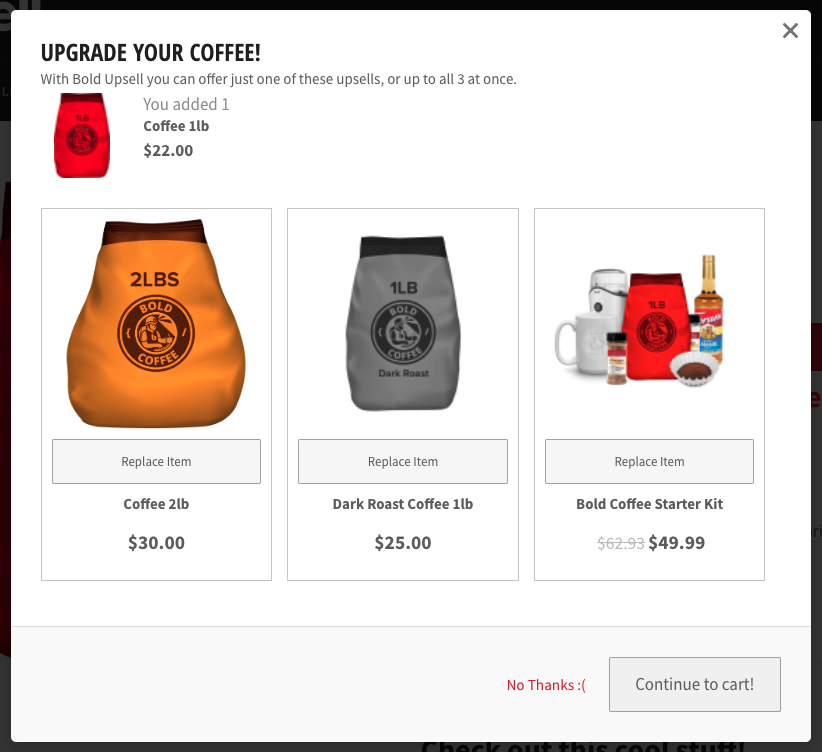
Upsells encourage your customers to upgrade their product and if accepted, replace an item in the customer's cart.
Example
A customer has added a 1-pound bag of coffee to their cart, triggering an upsell offer. The offer is to purchase a 2-pound bag of coffee instead, for only $8 more. If they accept this offer, the 2-pound bag of coffee replaces the 1-pound bag.
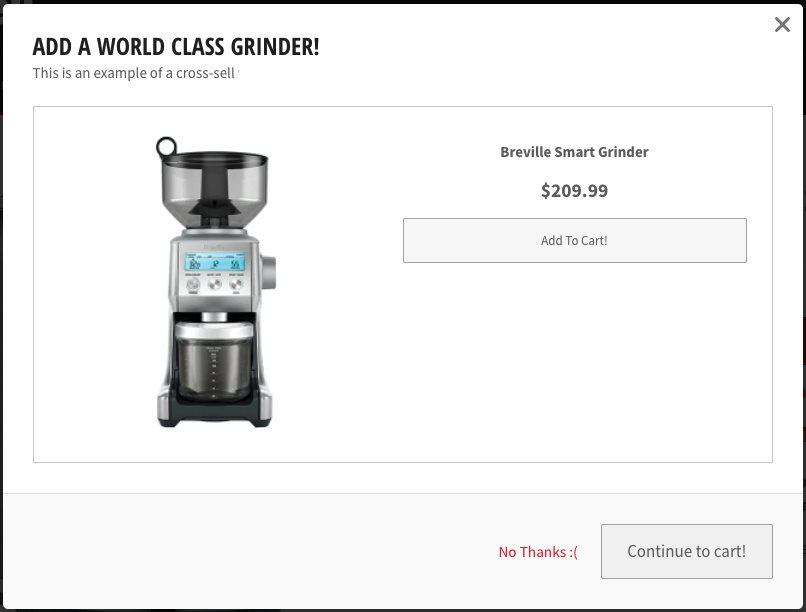
Cross-sells are offers that get added alongside products in a customer's cart. These items are often complementary to an item that a customer has just added.
Example
A customer has added an espresso machine to their cart, triggering a cross-sell offer. The offer is to purchase a coffee grinder as well. If they accept this offer, they will get both products.
Create as many offers as you'd like; there's no limit to this. However, we recommend to only create one offer per product.
Smart Offers
Create your offers manually, or let Upsell do all the work! Upsell’s Smart Offers feature fully automates the offer creation process for you by leveraging A.I. and your store's historical order data. Smart Offers take the guesswork out of creating the best converting offers for your store.
For more information, visit Smart Offers.
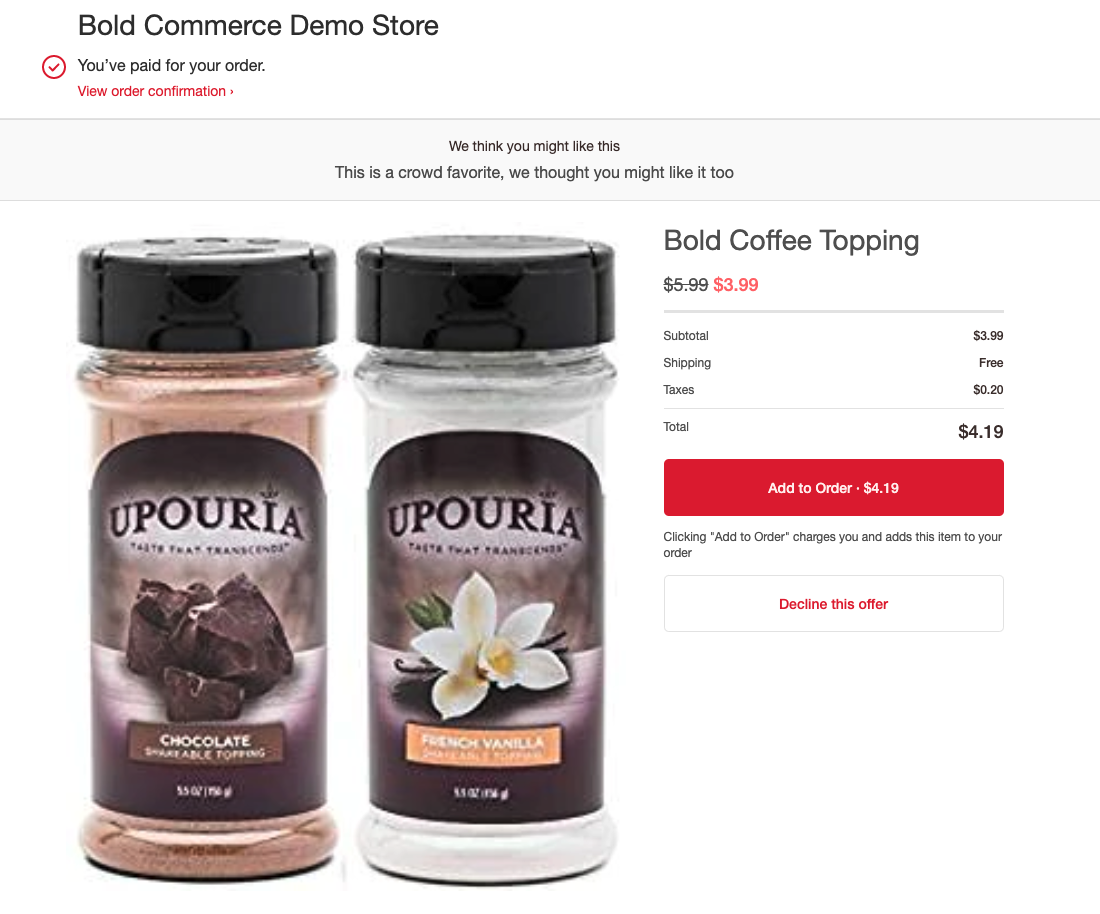
Post Purchase Pop-up offers
Post Purchase Pop-up offers appear in the Shopify checkout once your customer has finished checking out. To incentivize your customers further, you can offer an additional discount as well.
For more information on creating this offer, please visit Create a Post Purchase Offer.
Example
Post Purchase Email Upsells
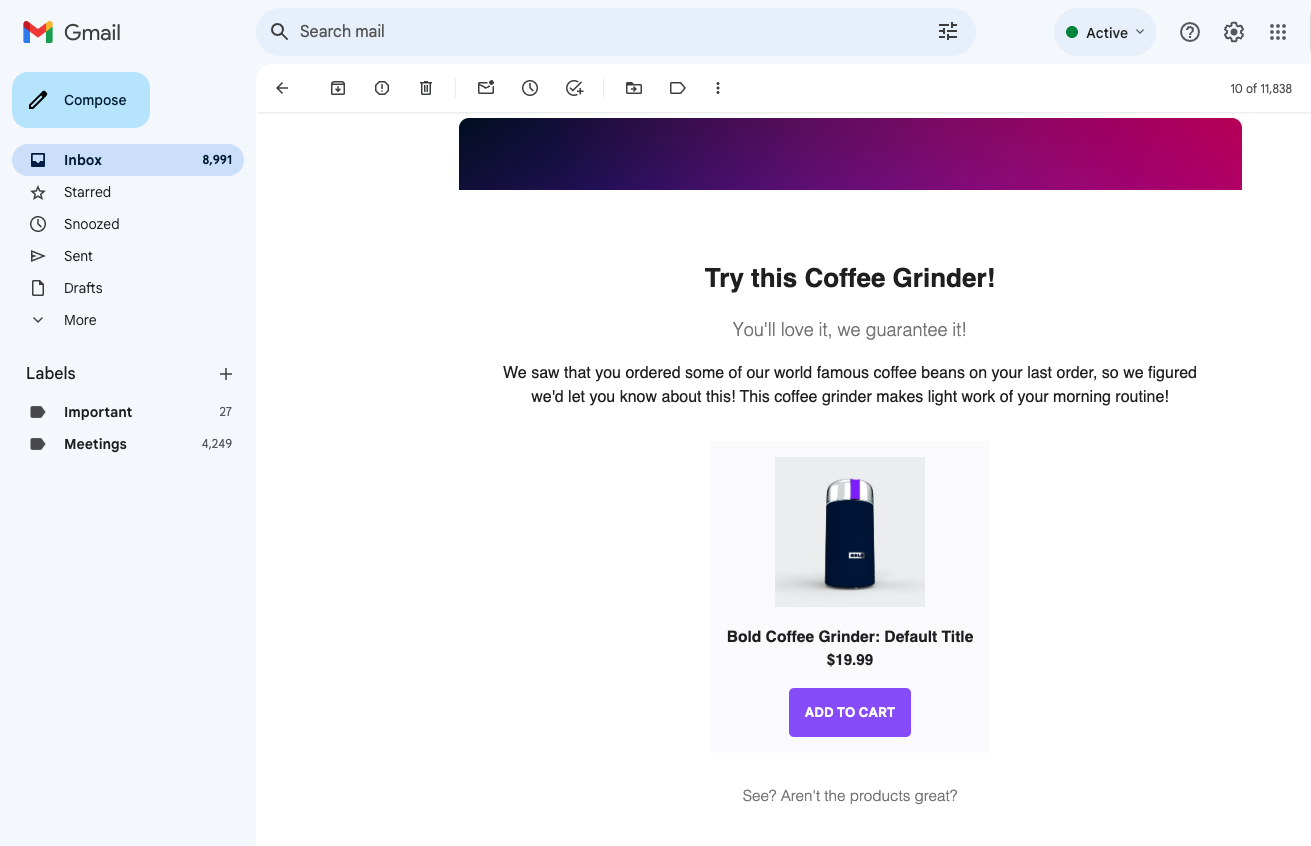
Post Purchase Email Upsells send product offers by email as soon as your customer completes a purchase on your store. Customers can click the add to cart button in the email to accept the offer. This automatically directs them back to your store's cart page along with the offered product.
To learn how to create this type of offer, please visit Post Purchase Email Upsells.
Example
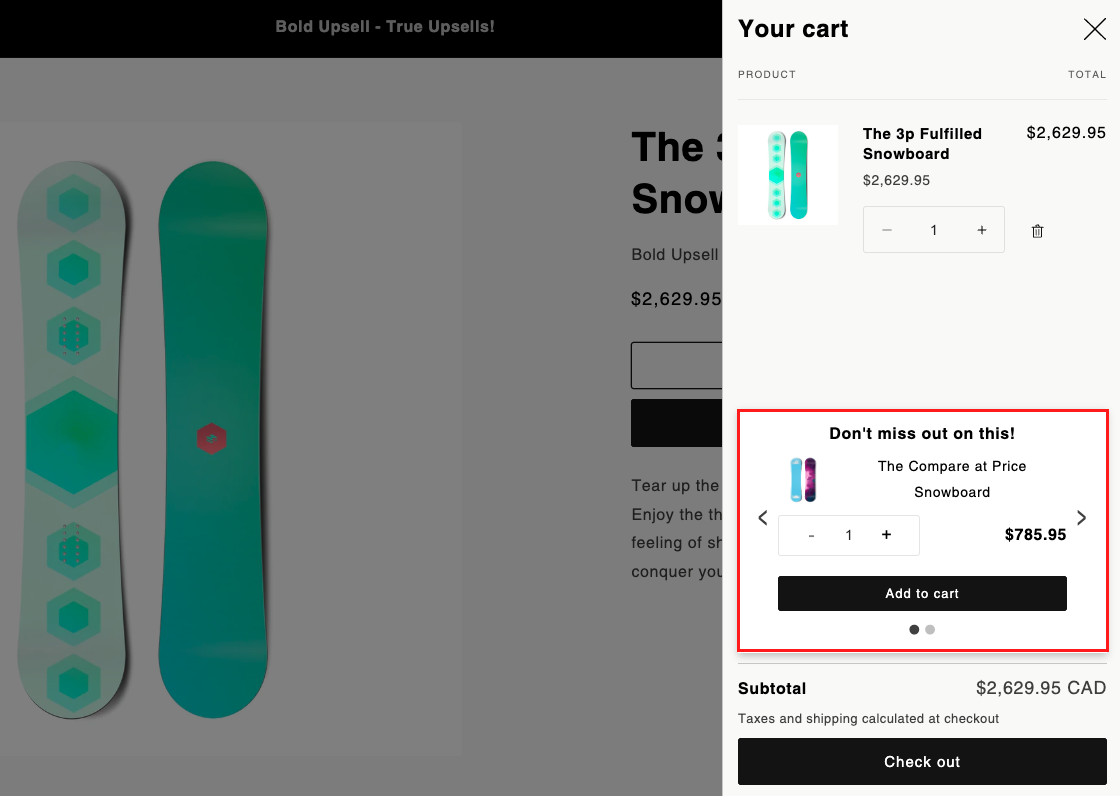
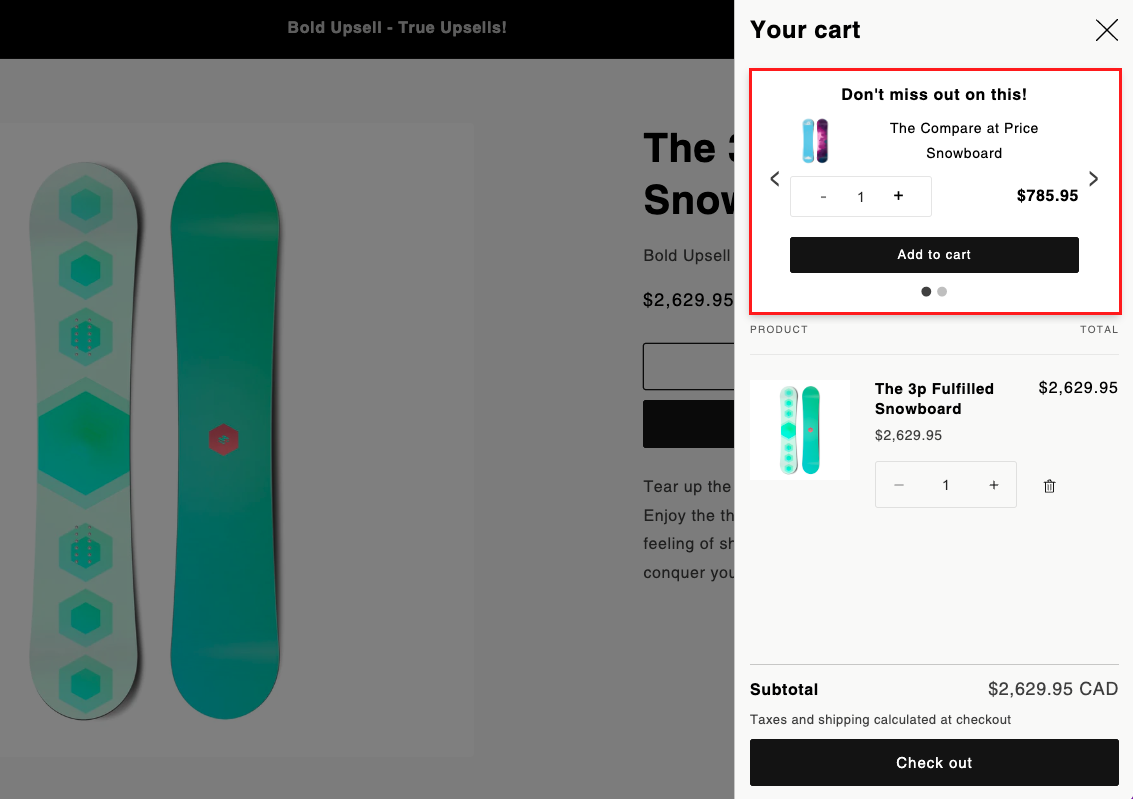
Cart Drawer Offers
Cart Drawer offers allow you to display a cross-sell offer right within the cart of your theme. You can easily customize the location of the offer within the app embed settings.
For more information on creating this type of offer, please visit Create a Cart Drawer Offer.
Example
In-Checkout Offers
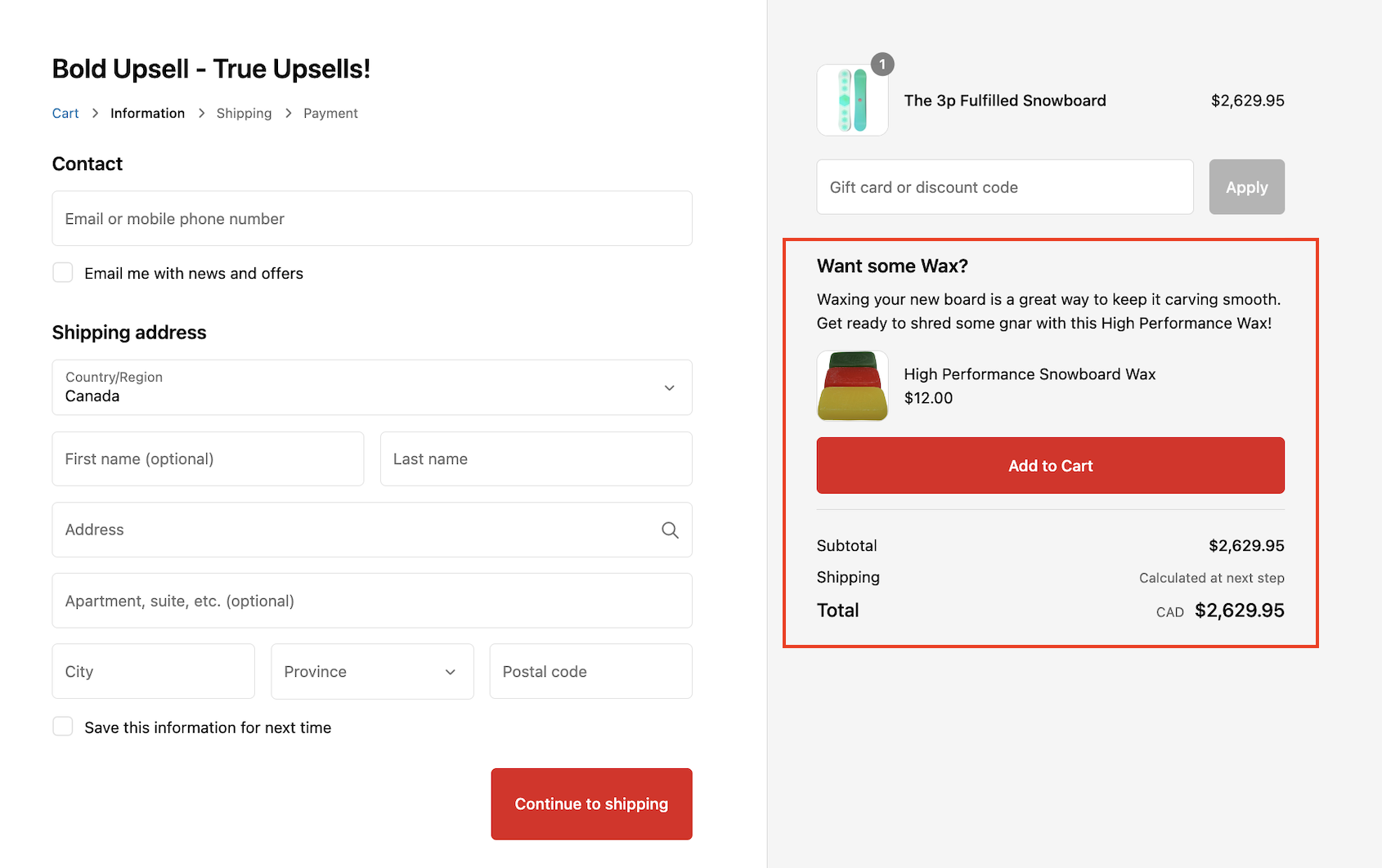
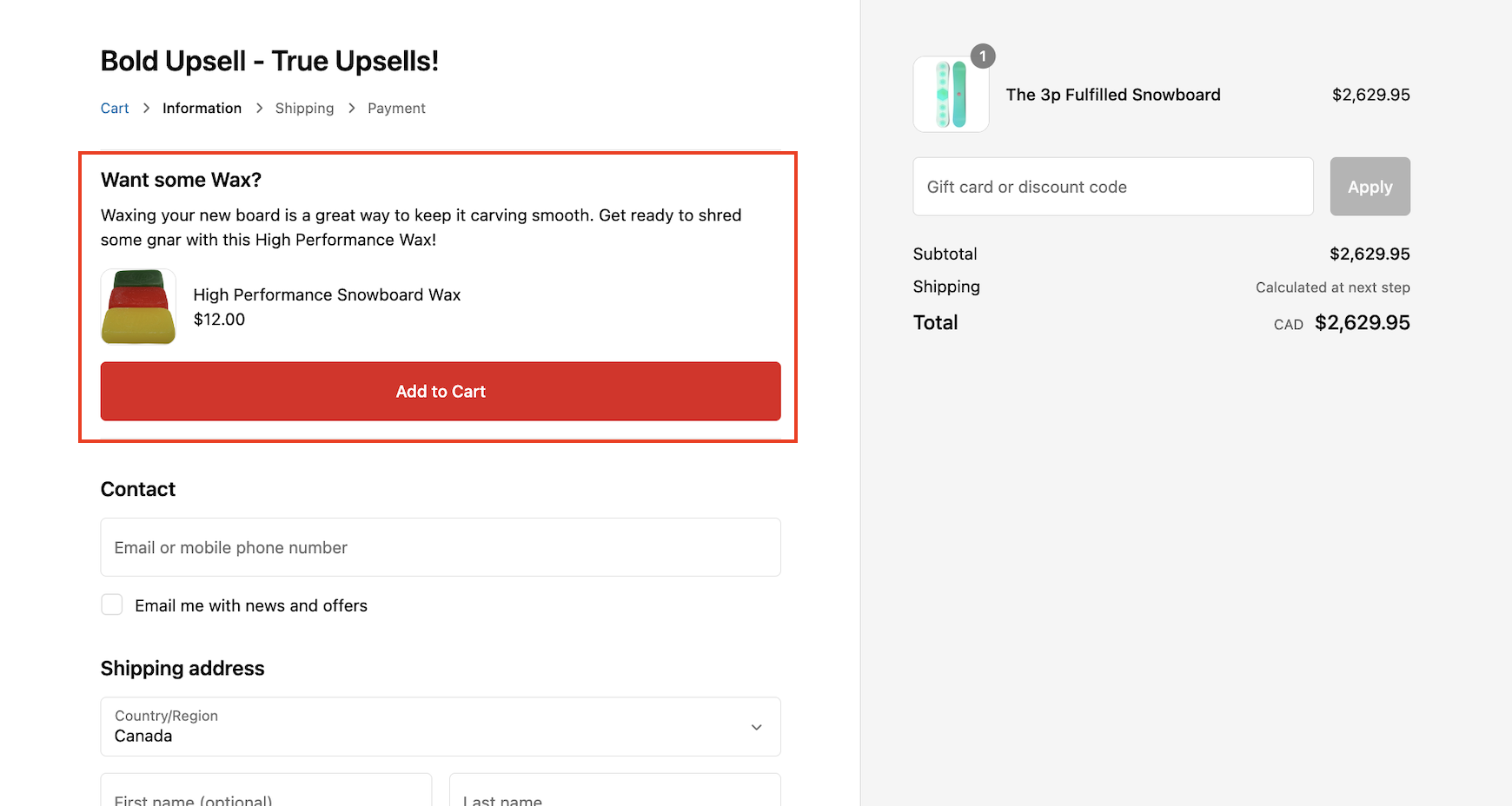
In-Checkout offers allow you to display a cross-sell offer right within the Shopify checkout. These offers are easily customized using the app block, and can be displayed in several locations of the checkout.
For more information on creating this type of offer, please visit Create an In-Checkout Offer.
Example
Individual variant selection
Upsell allows you to create offers by product or by variant. Both the trigger and the offer can be based on a specific product or a specific variant. The choice is yours!
Dashboard metrics & Reports
Bold Upsell provides comprehensive offer performance overview from the Dashboard. These metrics help you see how your offers are performing over a specific time period. Upsell's Reports page offers in-depth analytics, providing real-time statistics and historical data through tables and charts. You can track views, monitor products added to carts, and analyze purchases on individual offers to optimize your upsell and cross-sell strategies.
Read more about Upsell Analytics: Dashboard & Reports.
Design & language customization
Fully customize the Upsell modal by changing the button language, adjusting the style using HTML and CSS in your theme, or use the theme app extension.
Check out our Custom Upsell Template Styles and our Bold Upsell CSS Styling Guide.
Upsell Funnels
Funnels allow you to present additional items to your customers, depending on whether they accept or decline the previous offer. Funnels also allows you to offer multiple cross-sells that may be relevant to their order.
Example
A customer has added an espresso machine to their cart, triggering a Product Page Pop-up offer. The offer is asking if they want a coffee grinder to go along with their new machine, which they accept. The next funnel offer asks if they also like to try a new blend of espresso beans, which they decline. Finally, they are presented with a set of new espresso glasses, which they accept.
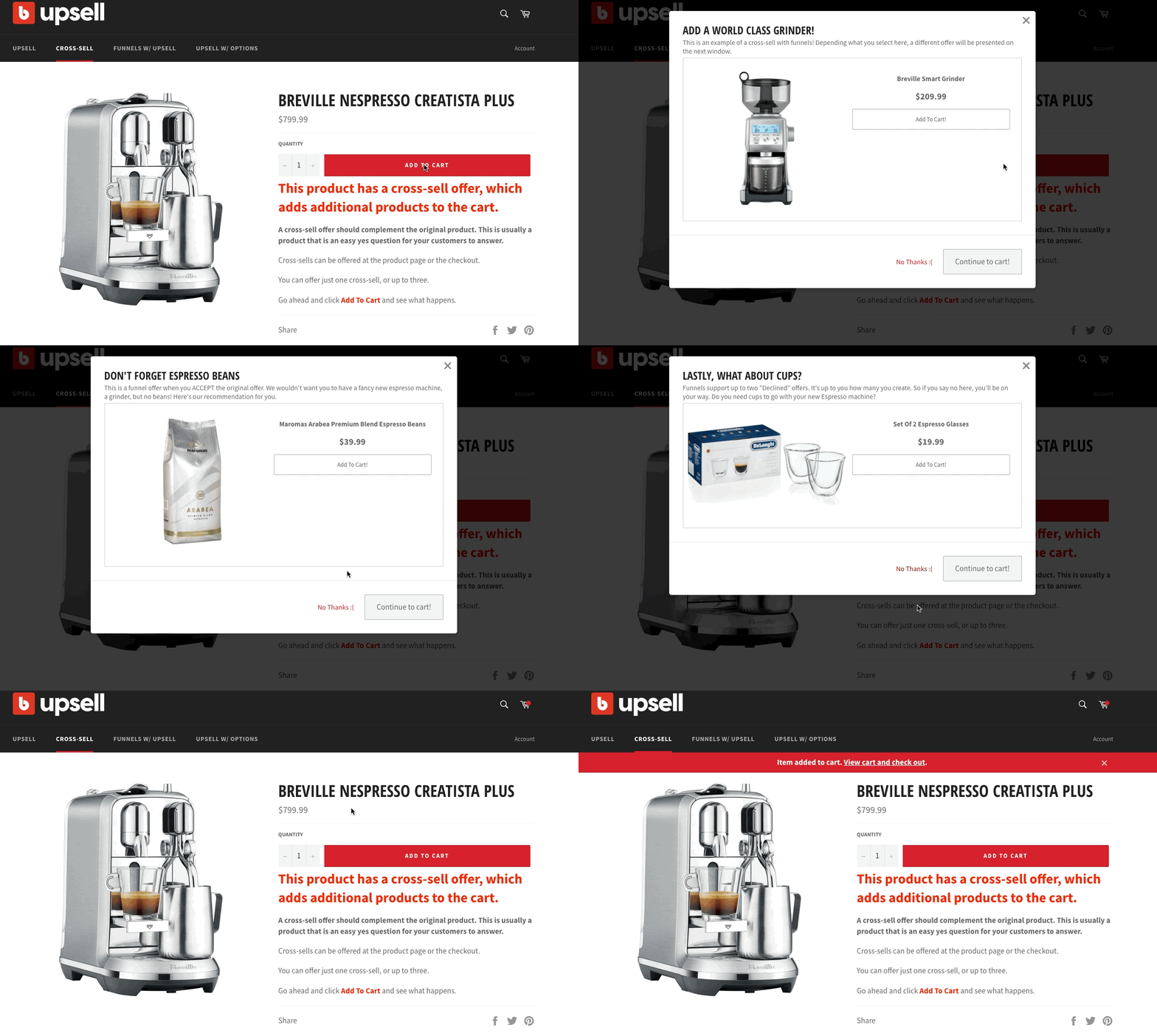
Please visit Bold Upsell Overview: Offers for more information on how the Funnels feature works with Bold Upsell.
Integrations
Bold Subscriptions
Bold Upsell integrates with Bold Subscriptions to allow you to create a variety of unique offers and help you increase your average order value as well as your life-time customer value. With this integration, you can create the following types of offers:
Upsell a Subscription - This allows you to convert a one-time purchase into a subscription.
Customer Portal Upsells - This allows you to present offers in the subscription customer portal.
Subscription Email Offers - This allows you to email product offers to existing subscribers in the subscription Upcoming Order email.
Cross-sell a one-time purchase when a customer is purchasing a subscription - This works with all trigger locations.
For more information on the integration between Upsell and Subscriptions, please visit Bold Upsell & Bold Subscriptions Integration.
Example
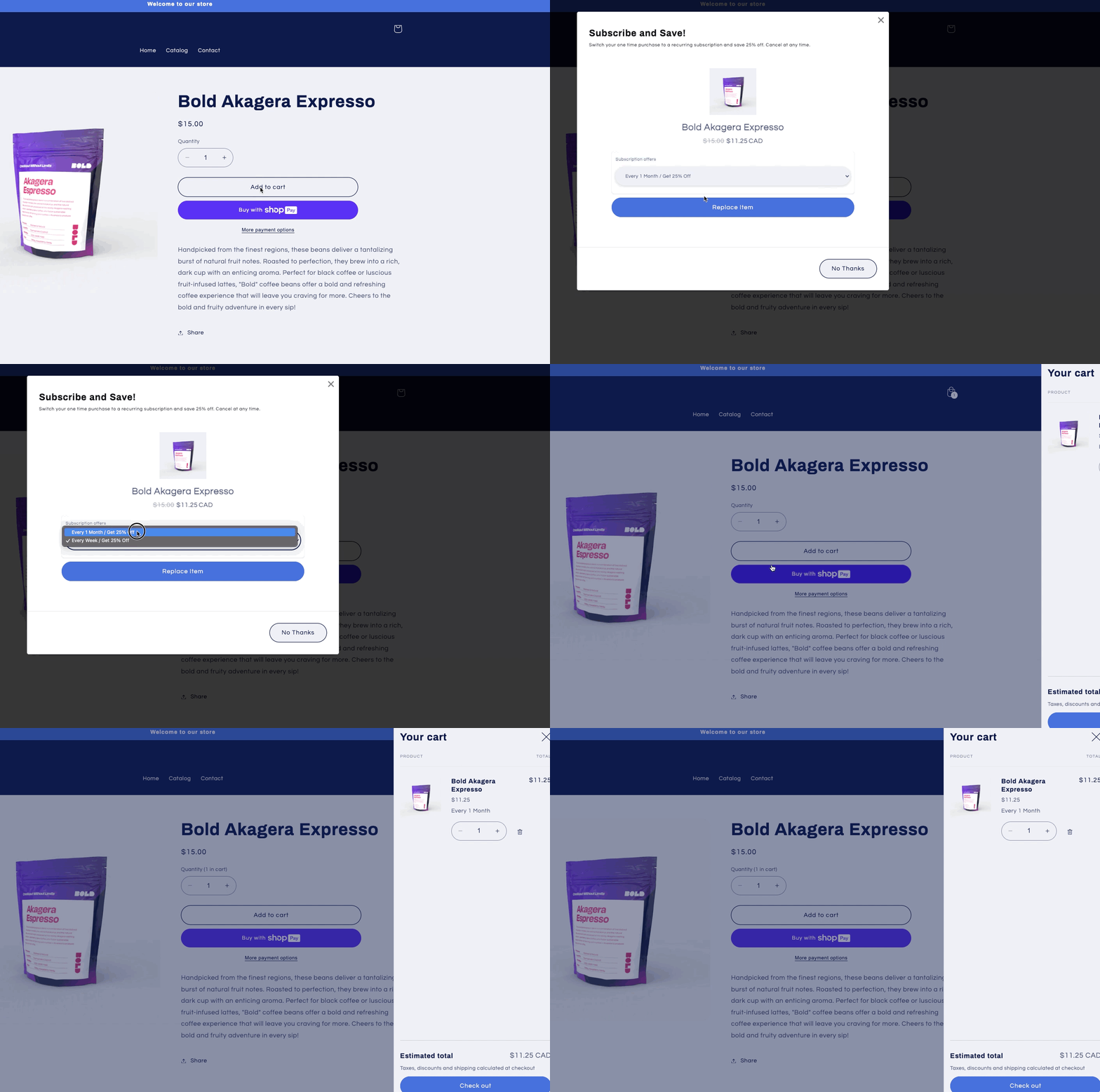
Bold Discounts
Upsell integrates with Bold Discounts to allow you to create Buy One Get One offers. In Discounts, you can use the Duplicate & Hide feature and display discounted products exclusively in the Upsell modal.
In these type of offers your customers must buy both items together in order to receive the discount. The discounted product is removed if the customer removes the first product when the Automatically remove items from the cart if the trigger or conditions are unmet setting is enabled.
Example
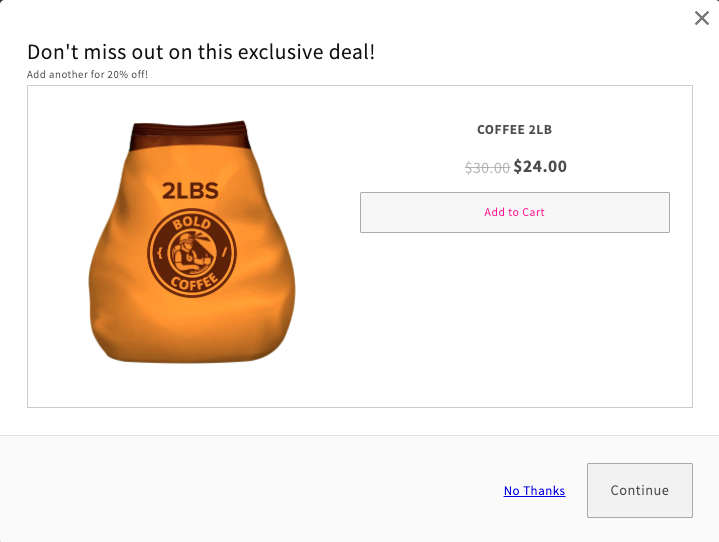
For more information on the integration between Upsell and Discounts, please visit Upsell & Bold Discounts Integration.
Third-party integrations
Bold Upsell has an official integration with Video Greet.
Video Greet lets your customers add a special video message to gifts purchased from your store. Recipients can view their video greeting through a special portal page or a QR code. When integrated with Upsell, you can give your customers the opportunity to add a video greeting to their order within an Upsell offer. For more information, please visit Video Greet & Upsell Integration.