
Custom Pricing Dashboard Metrics
Custom Pricing now includes metrics to help you measure the growth and engagement of your Custom Pricing program.
Data is currently available from April 16, 2026 onward and metrics are updated approximately every hour. This feature will continue to grow over time.
Note: Dashboard metrics are only available in Custom Pricing Standard Method V2 at this time.
Viewing your metrics
You can filter your metrics using the date and Customer Tag dropdowns. These filters work together, so you can narrow results by both date range and a specific customer tag at the same time.
Date range: Select from the last 7 days or set a custom date range using the date picker.
Note: Custom date ranges cannot be set earlier than April 16, 2026, as this is when reporting began.
Customer tag: Select a specific tag to view metrics for that customer group, or select All tags to view combined totals across all tags.
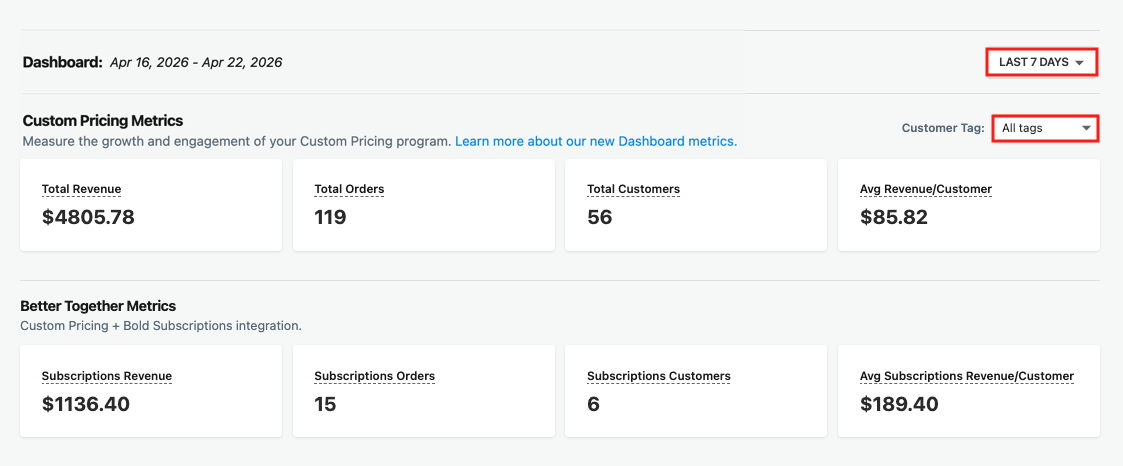
Custom Pricing Metrics
These metrics reflect orders placed by customers with Custom Pricing tags during the selected date range.
Total Revenue: Total revenue from orders placed by customers with Custom Pricing tags.
Total Orders: Total number of orders placed by customers with Custom Pricing tags.
Total Customers: Total number of unique customers with Custom Pricing tags who placed an order.
Avg Revenue/Customer: Average revenue per customer with Custom Pricing tags.
Better Together Metrics
Better Together Metrics show the performance of the Bold Custom Pricing and Bold Subscriptions integration. These metrics are available when Bold Subscriptions is installed and reflect the same date range and Customer Tag filter selected above.
To learn more about this integration, please visit Custom Pricing & Bold Subscriptions Integration.
Subscriptions Revenue: Bold Subscriptions revenue from orders placed by customers with Custom Pricing tags.
Subscription Orders: Total number of subscription orders placed by customers with Custom Pricing tags.
Subscription Customers: Total number of unique customers with Custom Pricing tags who placed a Bold Subscriptions order.
Avg Subscriptions Revenue/Customer: Average Bold Subscriptions revenue per customer with Custom Pricing tags.
How metrics are calculated
These metrics are powered by ShopifyQL. You can recreate and extend this analysis natively within your Shopify admin.
Metrics are calculated based on order tags applied to orders placed by customers with Custom Pricing tags. The following order tags are used: bold_csp_order and bold_csp_[tag-name] (e.g., bold_csp_wholesale).