
Subscriptions for Shopify Checkout Pricing & Overview
Bold Subscriptions for Shopify Checkout empowers you to quickly launch and scale your subscription business. Packed with features, it seamlessly integrates with your Shopify store to give you the ability to sell your products on a recurring basis. Bold Subscriptions provides a robust suite of features, including the ability to:
Create a variety of subscription types such as standard, prepaid, or convertible.
Allow customers to manage their own subscriptions directly in the customer portal.
Send customizable email notifications.
Set up a custom cancelation flow to reduce churn.
Download reports to analyze subscription data.
Increase Average Order Value (AOV) with Subscription MAXIMIZERS™ such as:
Dynamic discounts
Product add-ons (recurring or one-time)
Subscription Upsells
And so much more!
When you're ready, visit Set Up Subscriptions for Shopify Checkout.
Availability & installation
Bold Subscriptions is available on Shopify. Proper installation to your store's theme is required for correct functionality. You can choose from two installation methods:
Activate Subscriptions for Shopify Checkout: Follow our guided in-app onboarding flow.
Manual Installation Guide for Bold Subscriptions: For manual setup.
Note: Each theme on your Shopify store is different. If you switch to a new theme, you must be complete the installation steps for that new theme as well.
Price plans
Bold Subscriptions offers a variety of price plans to support businesses of all sizes, at all stages of growth. All plans include full access to all Bold Subscriptions' features.
A 30-day free trial is available on all paid plans for first time installers. During this period you are not billed for the monthly fee, however, transaction fees still apply to all orders that include a subscription.
Enterprise pricing is available for businesses generating over $1M in annual subscription revenue. Please contact our sales team for more information.
Below is an overview of our pricing plans:
| Launch | Grow | Scale | Ultimate Retention |
|---|---|---|---|---|
Monthly fee | $24.99 | $49.99 | $74.99 | $399.99* |
Transaction fee | 2% | 1% | 0.9% | 0.9% |
Ideal for | Stores with less than $2.5K subscription revenue per month | Stores with up to $25K subscription revenue per month | Stores with more than $25K subscription revenue per month | Stores wanting advanced cancelation prevention by ProsperStack |
Free trial | 30 days | 30 days | 30 days | None |
Number of subscribers | Unlimited | Unlimited | Unlimited | Unlimited |
Support | Standard | Standard | Standard | Priority +Onboarding with ProsperStack |
Dedicated migration support | Standard | Standard | Priority | Priority |
ProsperStack integration | ✔** |
* Satisfaction Guarantee. If you don't see a positive ROI from cancellation flows within six months, we'll refund you the difference between the Ultimate Retention plan and the Scale plan.
** Includes 1K subscriber cancellations sessions per month, $0.70 per session thereafter.
Feature chart
Subscription MAXIMIZERS™
| Launch | Grow | Scale | Ultimate Retention |
|---|---|---|---|---|
Default to Subscribe | ✔ | ✔ | ✔ | ✔ |
Dynamic discounts | ✔ | ✔ | ✔ | ✔ |
Try before you subscribe | ✔ | ✔ | ✔ | ✔ |
Convertible subscriptions | ✔ | ✔ | ✔ | ✔ |
(Customer portal) Product add-ons | ✔ | ✔ | ✔ | ✔ |
(Product page) Express Add-Ons widget | ✔ | ✔ | ✔ | ✔ |
Subscriptions & Bold Upsell MAXIMIZERS™
Subscription and Bold Upsell MAXIMIZERS™ are available to stores who also have Bold Upsell installed. Learn more about this integration in Bold Upsell & Subscriptions Integration.
| Launch | Grow | Scale | Ultimate Retention |
|---|---|---|---|---|
Subscription Upsells | ✔ | ✔ | ✔ | ✔ |
Customer Portal Upsells | ✔ | ✔ | ✔ | ✔ |
Subscription Email Upsells | ✔ | ✔ | ✔ | ✔ |
All features
| Launch | Grow | Scale | Ultimate Retention |
|---|---|---|---|---|
Standard subscriptions | ✔ | ✔ | ✔ | ✔ |
Prepaid Subscriptions | ✔ | ✔ | ✔ | ✔ |
Convertible subscriptions | ✔ | ✔ | ✔ | ✔ |
Subscription discounts | ✔ | ✔ | ✔ | ✔ |
Customer portal | ✔ | ✔ | ✔ | ✔ |
Customizable email notifications | ✔ | ✔ | ✔ | ✔ |
Analytics, activity logs & CSV reports | ✔ | ✔ | ✔ | ✔ |
Cancellation & dunning management | ✔ | ✔ | ✔ | ✔ |
Billing & fulfillment matching (cutoff days) | ✔ | ✔ | ✔ | ✔ |
Log in as customer | ✔ | ✔ | ✔ | ✔ |
Shopify checkout integration | ✔ | ✔ | ✔ | ✔ |
Changing your price plan
You can change your price plan at any time. Navigate to Account > Account plan in Bold Subscriptions.
Read more about how transaction fees are calculated in Transaction Fees in Subscriptions for Shopify Checkout.
Eligibility
To ensure your store is eligible to run Bold Subscriptions for Shopify Checkout, please visit Payment Options & Eligibility in Subscriptions for Shopify Checkout.
If you are interested in migrating your subscription business, please visit Migrating to Bold Subscriptions for Shopify Checkout.
Features
Standard subscriptions
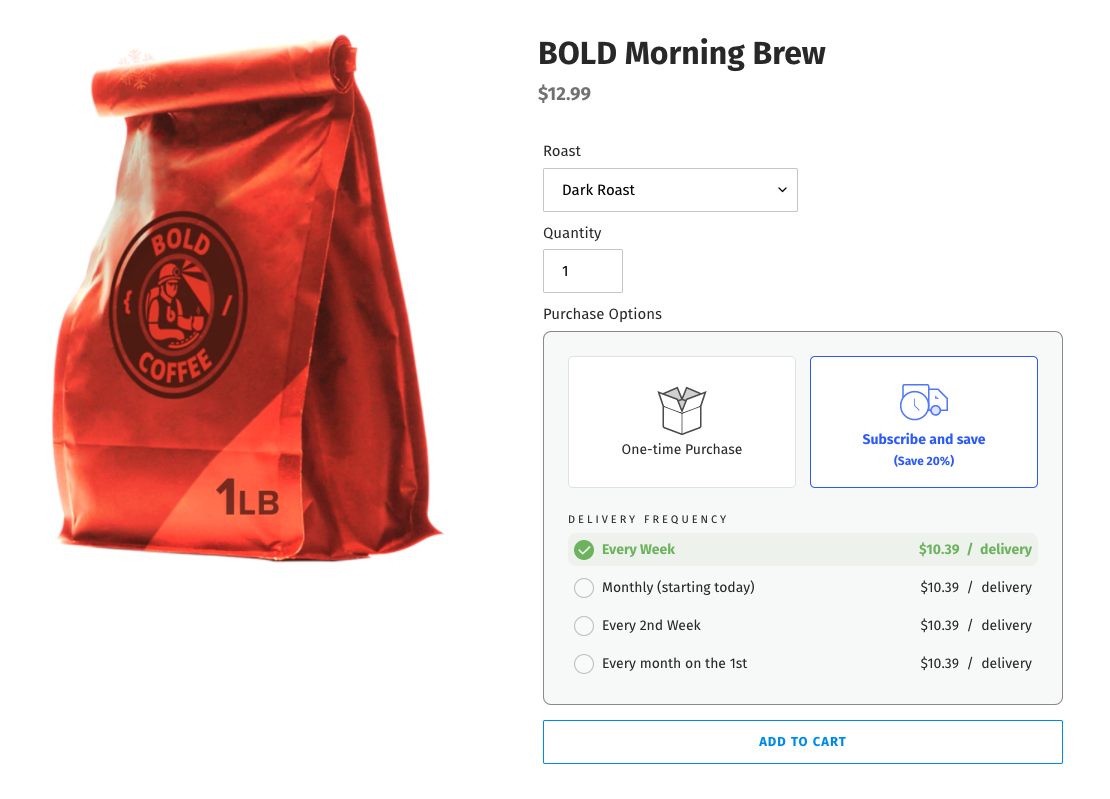
Easily add a subscription option to your products with just few a clicks. Offer subscribe & save discounts and a variety of frequency options to encourage recurring orders.
Create, customize, and build your own unique subscription offerings. Use the cutoff days feature to match your billing cycle with your fulfillment cycle for seamless operations.
To see how to set up a subscription, please visit Create a Standard Subscription Group.
Example
Prepaid subscriptions
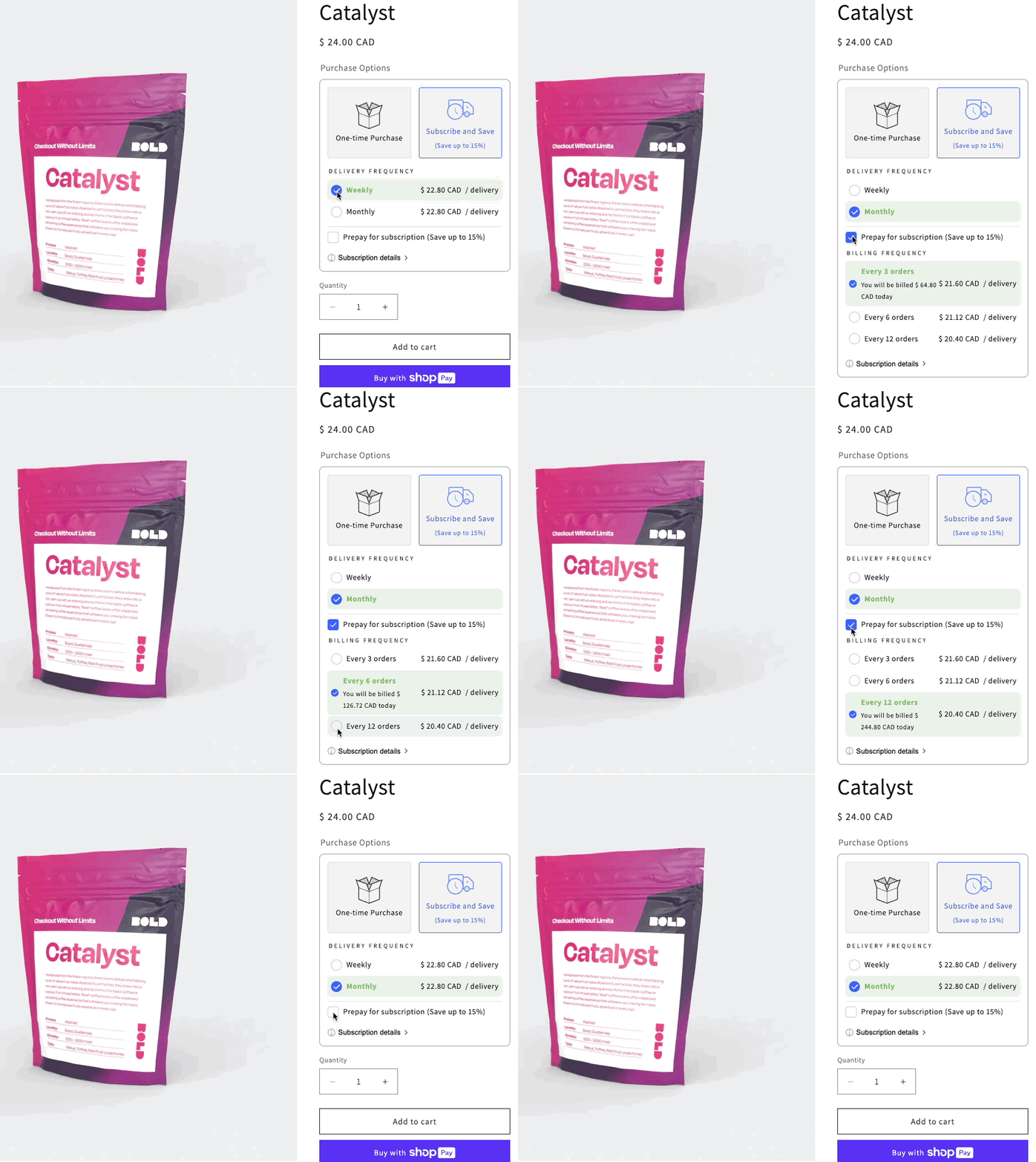
Give your customers the convenience of paying upfront for multiple orders while still receiving their orders on a recurring basis.
Prepaid subscriptions build customer loyalty and generate predictable recurring revenue for your store.
Offer your customers higher discounts for subscription periods. You can offer both standard and prepaid subscriptions at the same time, or offer prepaid subscriptions on their own.
To learn more about prepaid subscriptions and how to set one up, please visit Prepaid Subscriptions.
Example
Convertible subscriptions
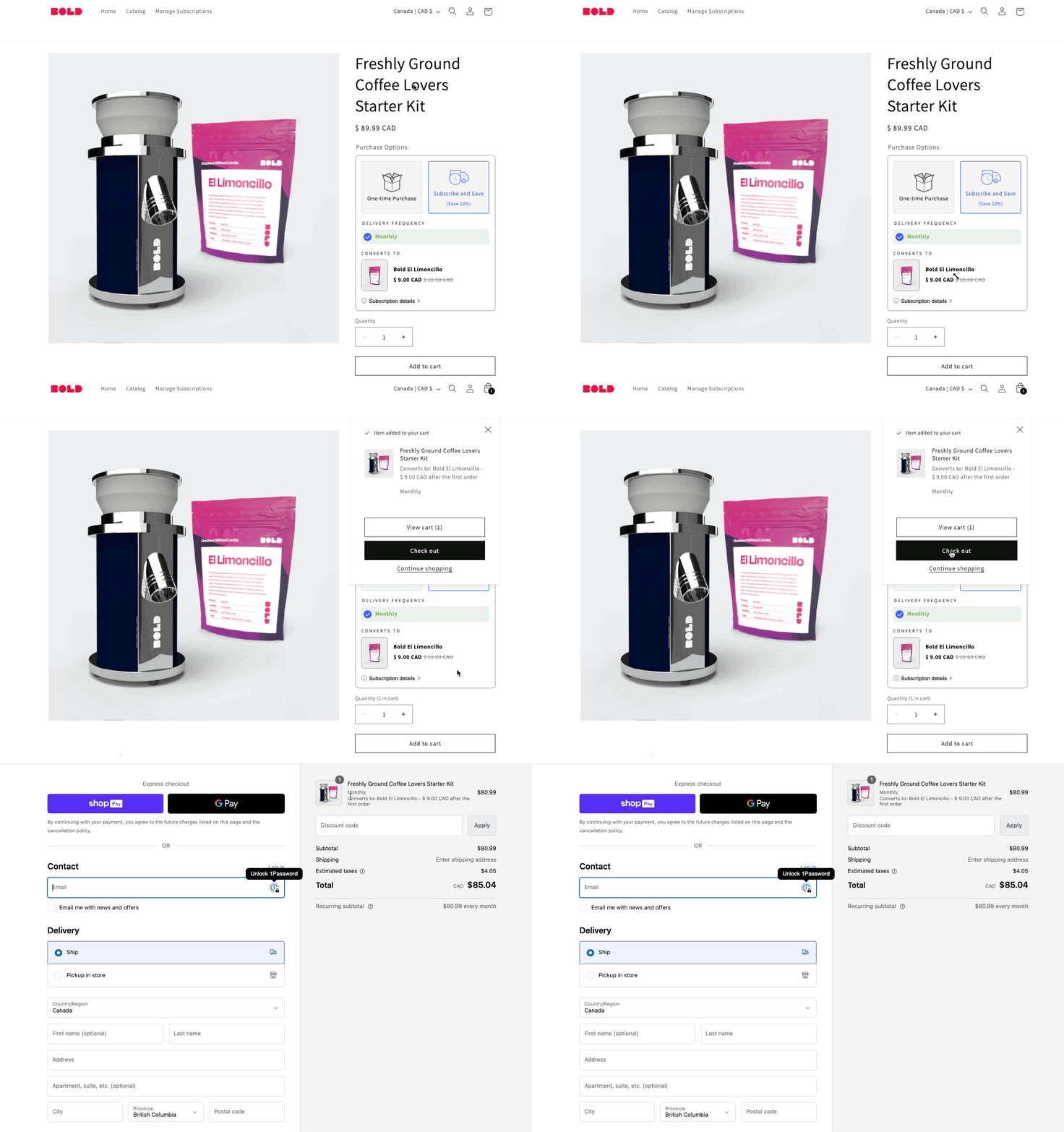
Convertible subscriptions allow you to automatically swap the product in your customer’s subscription to a different product after the initial order. This feature allows you to create unique subscription campaigns for your business.
The following examples provide some ideas:
Offer a trial-sized product that converts to a full-sized product.
Provide refills after the initial product is purchased, such as a dispenser for soaps, lotions, or scents.
Exchange a starter kit for a specialized product, such as a beginner cooking set that follows up with recipes, spices, or sauces.
Offer customers different discounts between the initial product and recurring product as an additional incentive to subscribe!
To learn more, please visit Convertible Subscriptions.
Example
Total customer control
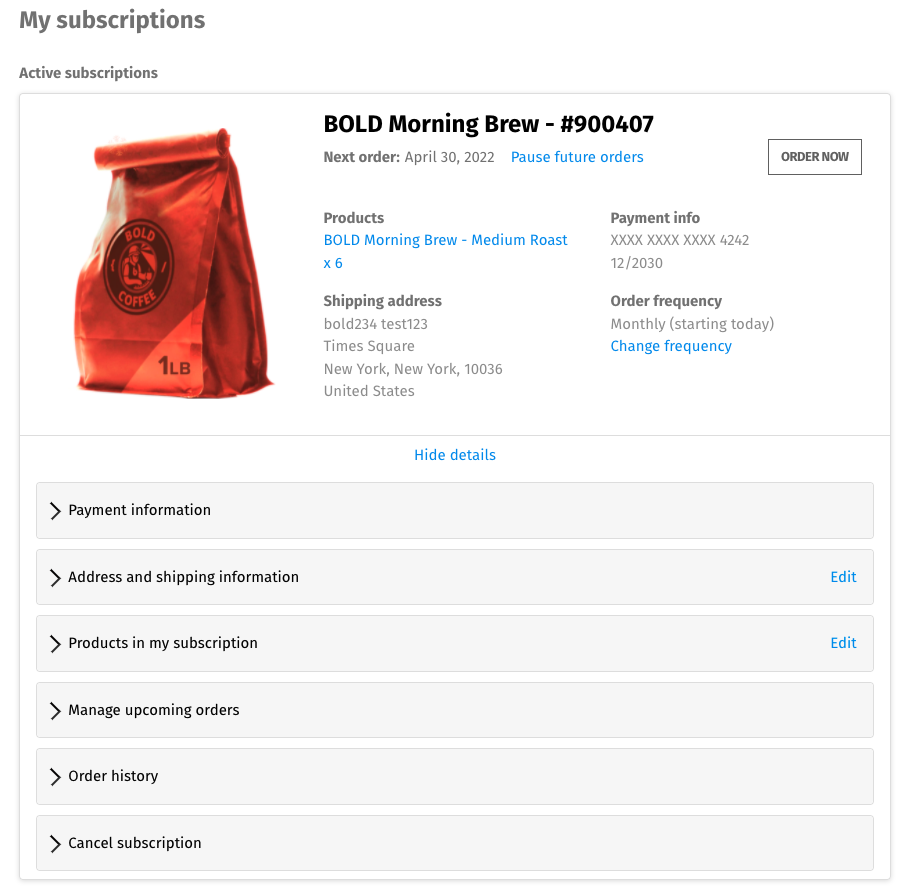
Customers can manage their own orders by editing, skipping, and swapping products within the Customer Portal. You can decide what actions your customers can perform within Bold Subscriptions' settings.
Allowing your customers greater flexibility in managing their own subscriptions can reduce churn. Customers may choose to skip an order rather than canceling altogether. Bold Subscriptions offers Passwordless login eliminating the need for customers to remember a password to manage their subscriptions.
To see a full list of actions that can be completed by your customers in the customer portal, please visit Subscription Management: Customer Perspective.
Example
Customizable email notifications
Bold Subscriptions offers a variety of email notifications you can use to send automatic notifications to your customers, such as:
Subscription Created
Transaction Failed
Upcoming Order
Expiring Credit Card
Subscription emails are fully customizable. Add a logo, adjust the wording, and provide specific instructions to your customer which are unique to your process. You can preview your customizations by sending a test email to yourself.
For more information on email notifications please visit Email Notifications in Subscriptions for Shopify Checkout.
Reports, activity logs & analytics
The in-depth reports, activity logs, and analytics within Bold Subscriptions allow you to download important information within a CSV file so you can analyze your business.
In the Dashboard, you can see valuable subscription information at a glance such as:
Active subscriptions
Average subscriber value
Churn rate, estimates, and trends
Under Reports you can download your current subscriber information and historical data in a CSV file:
All subscriptions
All customers
Customers by product
Cancelled subscriptions
Transaction fees and sales
The activity log allows you to review a log of all your customer's changes, app setting changes, and other activities. You can filter by event, user type, and date range.
For a detailed explanation of these features and all the available reports, please visit Dashboard Analytics, Reports & Activity Logs.
Voluntary & involuntary churn reduction
Reduce churn by creating custom cancellation flows for your customers and managing situations when transactions fail, through the Cancellation and Dunning Management settings.
Using these tools, you can collect feedback from your customers if they choose to unsubscribe. When a transaction fails, you can determine the number of tries Bold Subscriptions performs along with which actions. You can choose to simply pause a subscription, or skip the order instead of allowing the subscription to be cancelled.
To read more about using these features along with their setup, please visit Cancellation & Dunning Management in Bold Subscriptions for Shopify Checkout.
Full subscription management tools
Not only can your customers manage their own subscriptions through the Customer Portal, but you are also able to access each of your customer’s subscriptions to perform a variety of actions. Edit upcoming orders, add a product to an existing subscription, pause or reactivate subscriptions and more.
Use the log in as customer feature to view and use the customer portal as your customer would. This allows you check the permissions you have enabled for your customers, as well as troubleshoot any issues on your customer may be having on their end.
To read more about all the actions you can perform when managing your customer’s subscriptions, please visit Subscription Management: Merchant Perspective.
Subscription MAXIMIZERS™
Maximize your average order value with Subscription MAXIMIZERS™.
MAXIMIZERS™ are designed to make subscribing easy, as well as expand your ability to create unique and attractive subscription offers.
Default to Subscribe
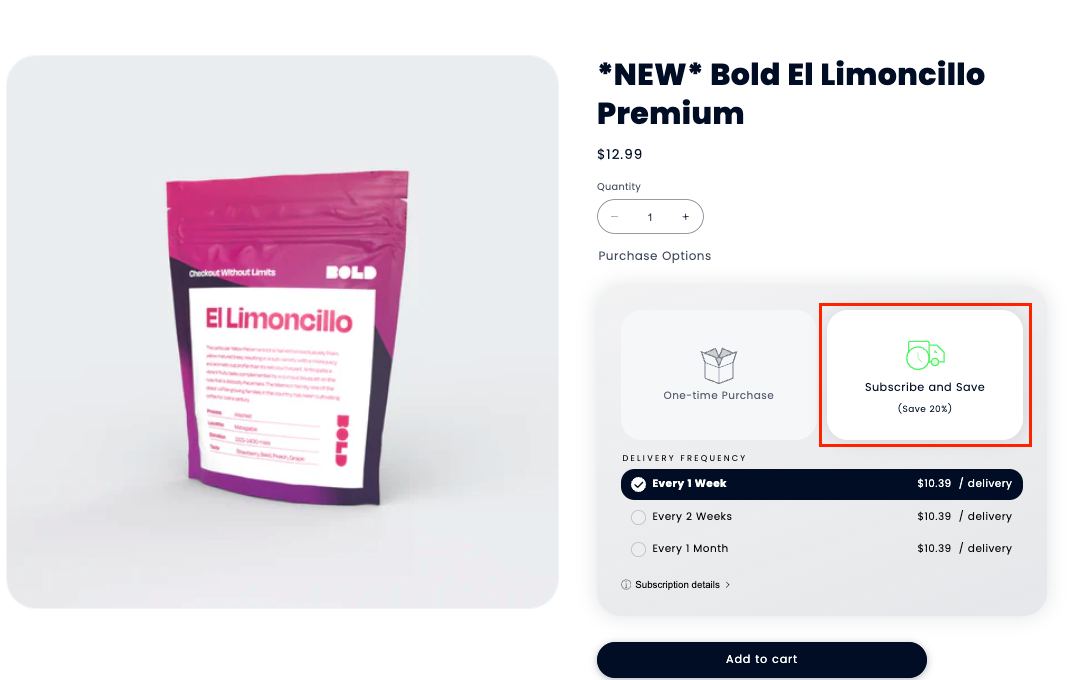
Bold Subscriptions allows you to set the default option on your product pages to Subscribe and Save. This helps improve conversion by reducing the number of steps it takes for your customers to checkout with a subscription.
To learn more about this MAXIMIZER™, please visit Default to Subscribe.
Example
Dynamic discounts
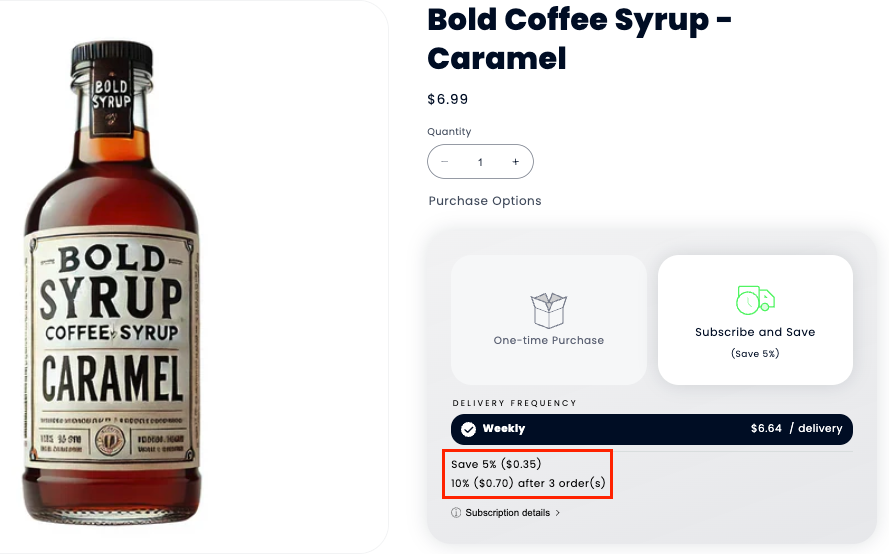
Dynamic discounts allow you to change the discount automatically after a specific number of orders have passed. This allows you to reward customer loyalty while keeping customers subscribed to your products longer.
Read more about this MAXIMIZER™ in Dynamic Discounts.
Example
Try Before You Subscribe
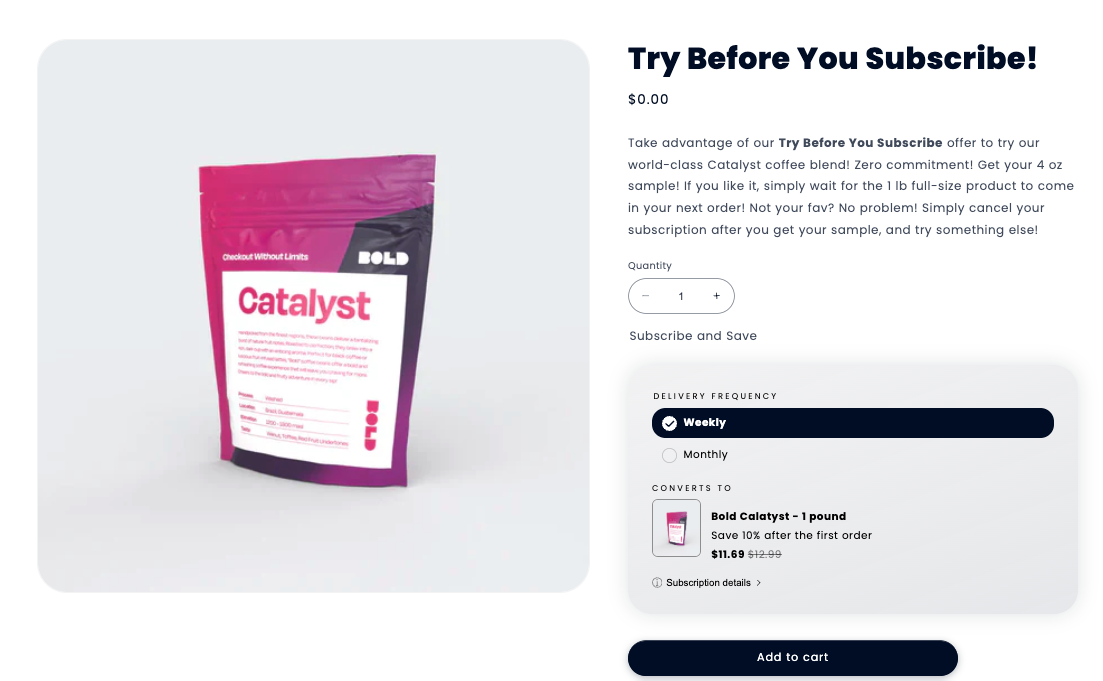
Try Before You Subscribe allows you to convert a sample product into a full-sized subscription product. These offers remove almost all friction from the initial subscription commitment and encourage your customers to become loyal subscribers.
To learn more about this MAXIMIZER™, please visit Try Before You Subscribe.
Example
Product add-ons
Product add-ons allow your customers to conveniently add products to their existing subscriptions right from the customer portal. Customers can add products as recurring orders or just one time, depending on how you offer the product on your store.
To learn more about this MAXIMIZER™, please visit Product Add-Ons.
Example
Customer portal view
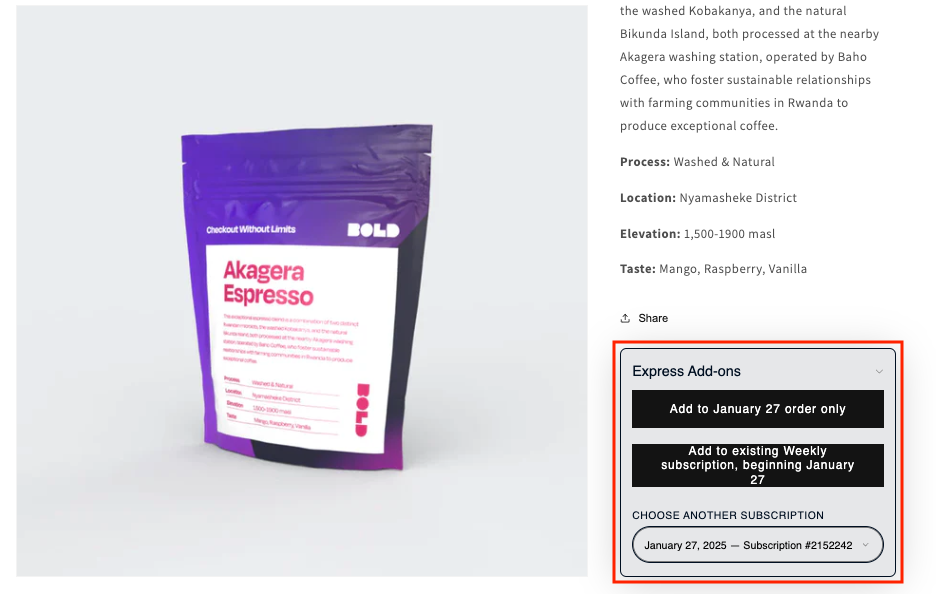
Express Add-Ons Widget
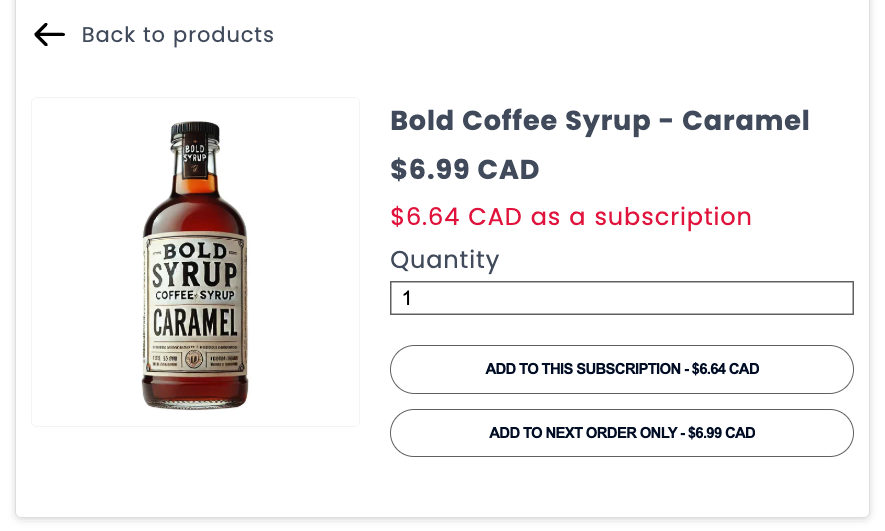
Add the Express Add-Ons widget to your product pages to allow your existing subscribers to quickly and easily add more products to their upcoming orders. Products can be added as a one-time purchase or recurring order, depending on how you offer the product to your customers.
Read more about this MAXIMIZER™ in Express Add-Ons Widget.
Example
Subscriptions & Bold Upsell MAXIMIZERS™
Bold Subscription integrates with Bold Upsell to help maximize your conversions and increase your lifetime customer value. With both apps together, you can display unique product offers in new locations and convert one-time customers into loyal subscribers.
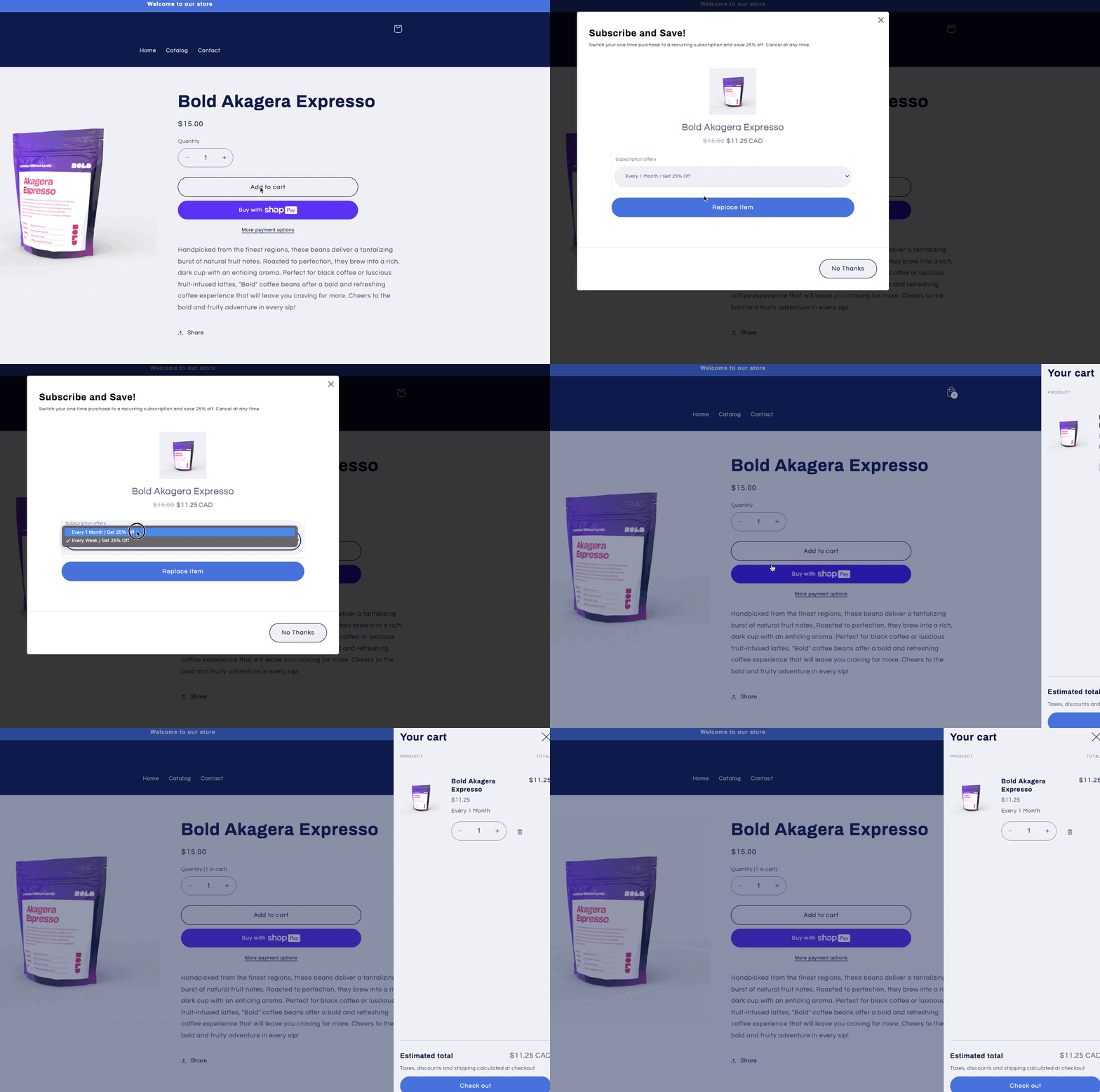
Subscription Upsells
Convert one-time buyers into regular subscribers by suggesting a subscription when a customer adds a one-time product to the cart. Customize your offer to display a message in the pop-up modal, and showcase the value of subscribing one more time—before your customers leave the page.
To learn more about this MAXIMIZER™, please visit Subscription Upsells.
Example
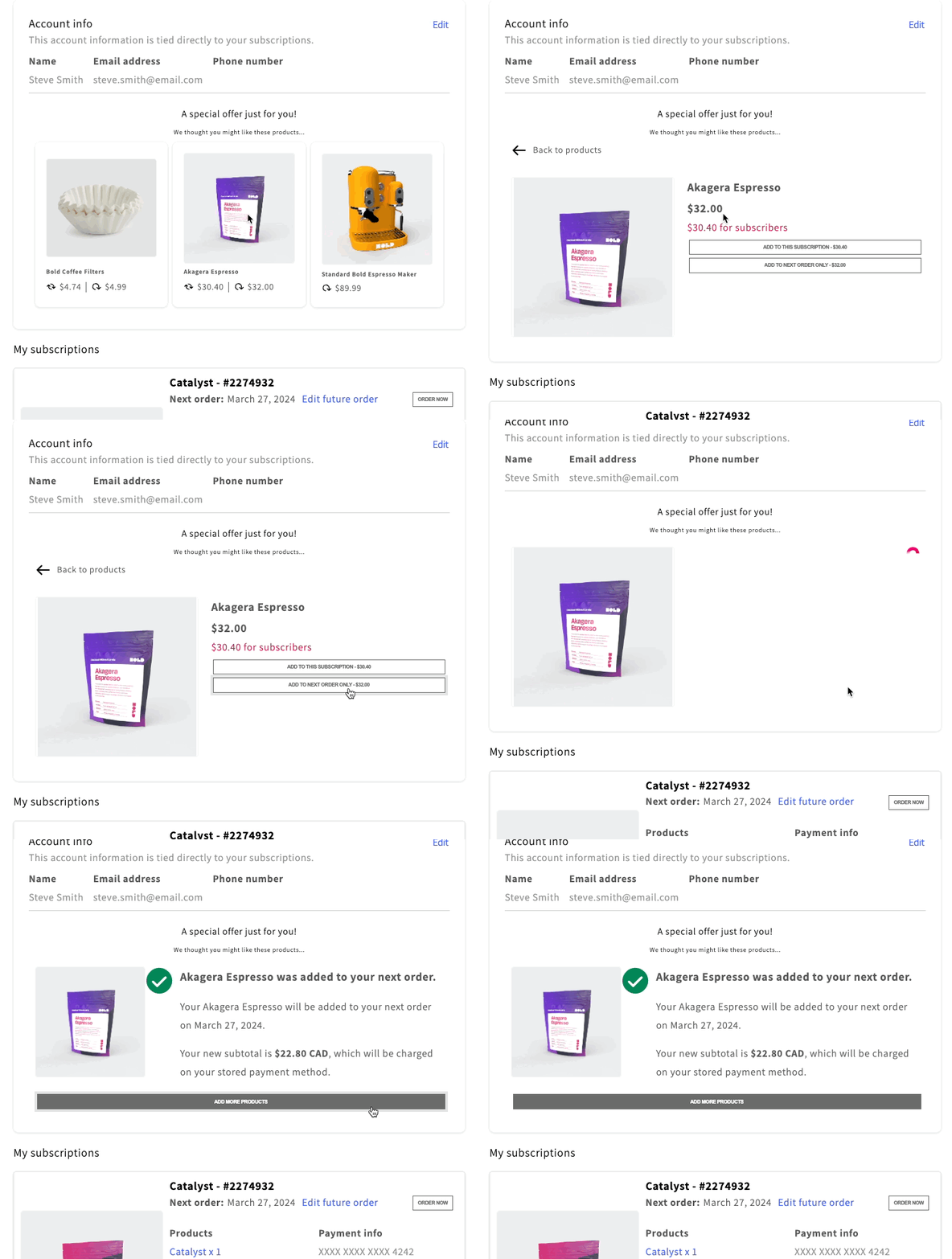
Customer Portal Upsells
Customer Portal Upsells allow you to display product offers to your existing subscribers right in the customer portal. Your customers can add the product to their existing subscription order as either a one-time purchase or a recurring order, depending on how you offer the product on your store.
Read more about this MAXIMIZER™ in Customer Portal Upsells.
Example
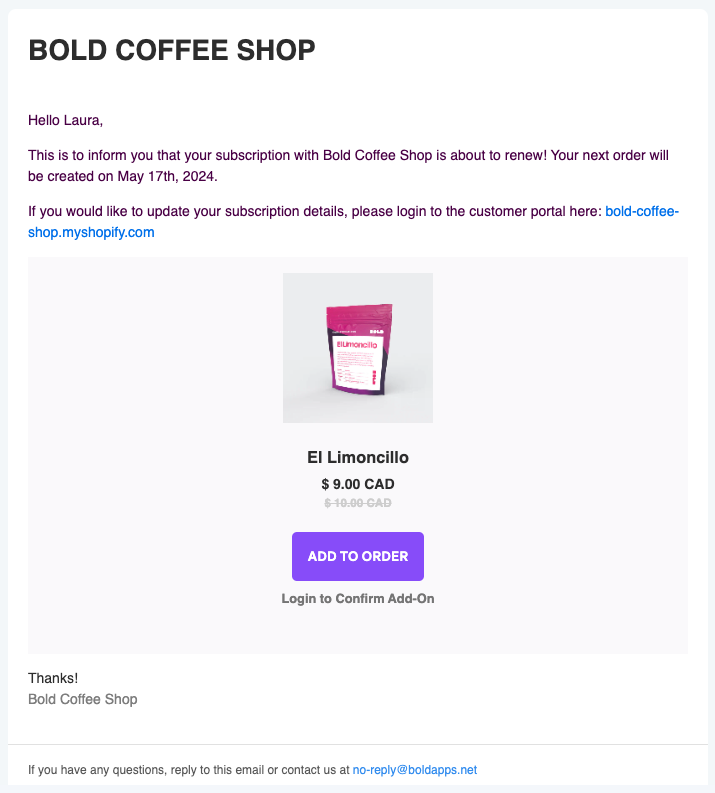
Subscription Email Upsells
Subscription Email Upsells allow you to use Subscriptions' often opened Upcoming Order email to email product offers to your existing subscribers. Allow your existing subscribers to quickly add additional products to their upcoming order.
Learn more about this MAXIMIZER™ in Subscription Email Upsells.
Example
When Subscriptions is integrated with Bold Upsell, you can also offer one-time purchase products to customers who are purchasing a subscription on the storefront. Read more about this and more in Bold Upsell and Subscriptions for Shopify Checkout Integration.
Third-party integrations
More developers are choosing to build with Bold everyday. These powerful integrations help increase the functionality of Bold subscriptions and expand your business model. For example, you can:
Offer gift subscriptions using the new integration with Govalo Gift Cards.
Create SMS, MMS and text marketing campaigns and services using Bold webhooks with SimpleTexting.
Deliver targeted multi-channel marketing campaigns to your Bold subscribers with Klaviyo.
Track subscriptions that are processed in the Shopify checkout with Google Analytics and Littledata.
Connect Bold Subscriptions to over 2,000 other web services with Zapier.
Increase your average order value and turn a one-time purchase into a subscription with Bold Upsell.
For more information on these integrations and more, please visit our Integration Hub for Bold Subscriptions for Shopify Checkout.